
The agent works. It handles every test invoice and the answers hold up. Then comes the production deployment, and the questions change: which Stripe key does the agent hold, which database does its connector point at, and what happens to a real customer if a half-finished branch ships?
We address this with environments: the same agent specification, deployed several times, each deployment wrapped in its own configuration. This post walks through how the isolation works, from git branch mapping to secrets, connectors, budgets, and the test gate that stands between a merge and production.
What is a Connic environment?
An environment is a complete, isolated context for running agents. The agent specification stays identical across environments, with the same YAML and Python versioned in Git. Everything around the agent changes per environment:
${STRIPE_API_KEY} reference resolves to a sandbox key in staging and the live key in production.The isolation goes deeper than configuration. Database rows, agent sessions, retrieval content, variables, and connectors are all keyed by environment, and each environment runs on its own runtime service with its own event queue. A staging trigger cannot land in a production runner.
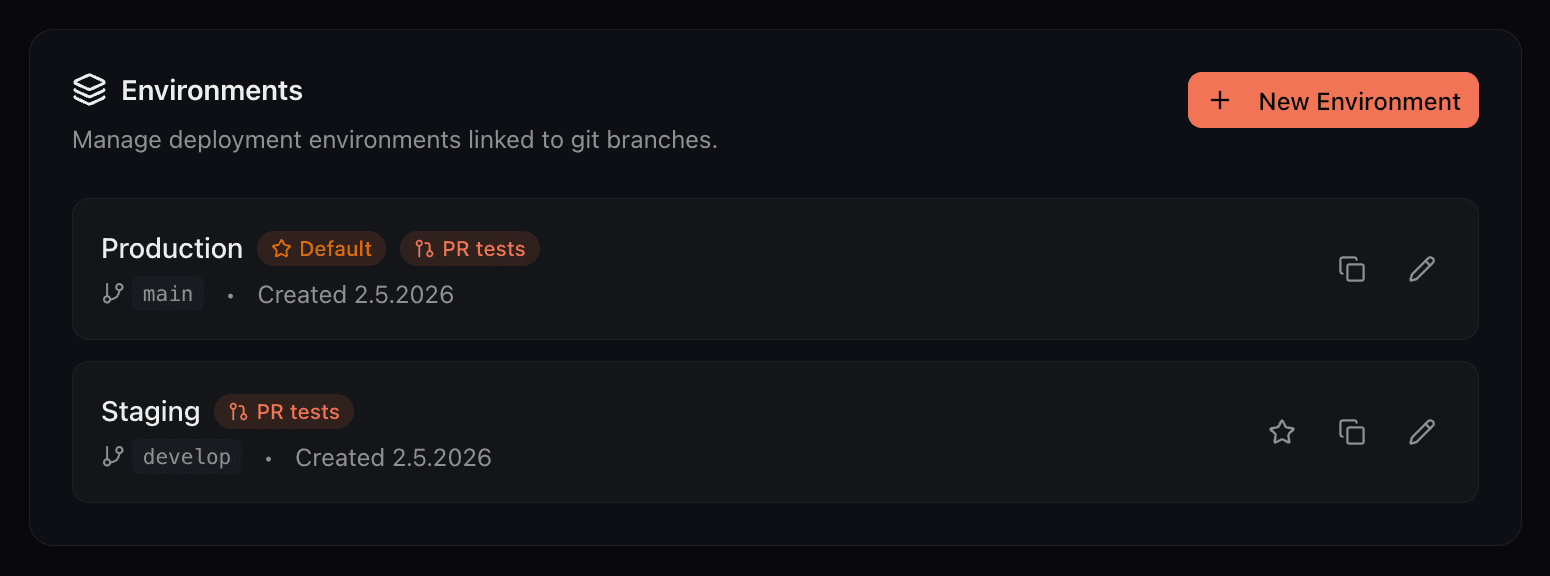
Every project starts with a default environment, and a common setup adds a second one: Production tracking main, Staging tracking develop. Creating an environment takes a name, a branch to track if a repository is connected, and optionally a copy of another environment's variables. The default environment is what the dashboard opens on and what connic deploy targets when no environment is given.
Git branch mapping does the routing
Each environment can track one git branch. Push to that branch and Connic builds a new deployment for that environment from that exact commit. Pushes to branches that are not mapped to any environment are ignored. Two things about this routing are easy to miss:
Push twice in quick succession and the newer deployment supersedes the older one still building. Activation never drops work either: the previous deployment drains its in-flight runs before stopping, and queued runs are re-triggered against the new one.
Projects without a git connection, and teams that deploy from CI, use the CLI instead. Every environment has an ID available in its settings:
# deploy the current commit to a specific environment
connic deploy --env <environment-id>
The deployment pipeline documentation covers the full build, test, and activation flow, including CI examples.
One project maps two branches and deploys the same agent to staging and production with separate credentials.
Get started freeVariables and sensitive values
Environment variables are per-environment key-value pairs. Supported fields in agent YAML, such as MCP server URLs and headers, reference them as ${VAR_NAME}, and Python tools read them from os.environ. Values resolve at deploy time to whatever the active environment has bound, so the committed YAML holds no credentials at all.
Mark a variable as sensitive and its value is masked in the dashboard after creation, masked in logs, and never returned by the API again. Values are stored encrypted and injected into the agent containers at deploy time.
Because injection happens at deploy time, variable changes, including secret rotations, take effect on the next deployment. The running deployment keeps the previous values until the next deployment. For bulk work, a variable can be created across several environments in one step, and a new environment can start from a copy of another's variables. Our production security guide describes the wider security controls.
Connectors are wired per environment
Connectors, the pieces that trigger agents from external events such as Stripe webhooks, Kafka topics, Postgres notifications, or inbound email, belong to exactly one environment. The staging Stripe connector and the production Stripe connector are two separate connectors with separate configuration, separate credentials, and separate run histories.
This is the part plain .env files never covered. Two sets of keys are easy to store somewhere. The event wiring is not: which topic, which webhook endpoint, which inbox. In Connic that wiring belongs to the environment and switches with it.
Local development gets the same treatment. A connic dev session runs in its own dev environment, ephemeral or named, with its own variables and connectors, grouped separately in the environment selector. A hot-reload experiment cannot accidentally point a webhook at production.
Budgets that stop at the environment boundary
Model spend is scoped the same way. Budget rules come in two types: alerts that notify, and limits that hard-stop. Either can target the whole project, specific environments, or specific agents, on a daily or monthly period.
A limit does not kill anything. When spend crosses the threshold, new runs in the scoped environments are queued instead of started, with the reason recorded on each run. Once the period rolls over or the limit is raised, queued runs resume automatically within minutes. A typical setup is a small daily limit on staging and an alert-only threshold on production. The usage documentation covers spend alerts and limits.
The deploy gate: tests before anything ships
Every deployment, whether triggered by a push or the CLI, passes through the deploy gate before it can serve traffic:
tests/ directory against the just-built image.Projects without a tests/ directory skip the gate, and it can be toggled per environment. The CLI has a --skip-tests escape hatch, but git-triggered deploys never use it: a merge cannot sneak past the suite.
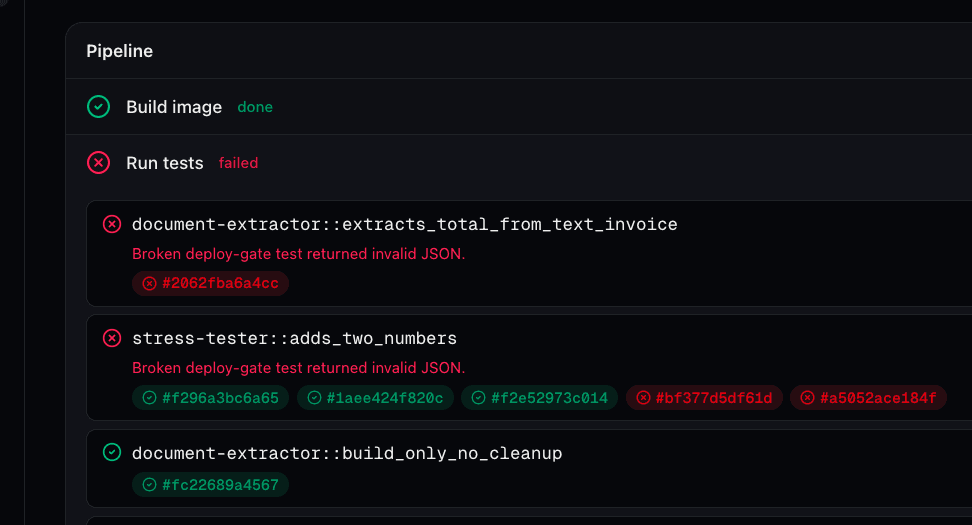
Point the gate at test credentials
By default the suite runs in the environment being deployed, with that environment's variables and connectors. In production, that would be unsafe: a release test should not charge a real card or write to the live database. The fix is the test environment override. Point Production's Test environment setting at a sibling environment, say prod-test, that holds stub credentials and stage-only connectors. The gate then executes the suite with that environment's variables and credentials, and the test runs land in its run history rather than production's.
Run the suite before the merge
The same suite can also run before the merge instead of after it. For a branch-mapped environment with PR testing enabled, every pull request targeting that branch runs the tests, in the test environment if one is set, and reports a connic/pr-tests status on the commit, so teams can require a green check before merging. PR testing is available on the Pro plan. The testing documentation explains the deploy gate and PR testing. Our testing framework guide covers test case definitions.
A safe release, start to finish
Put together, a release to production looks like this:
Map the branches. Production tracks
mainand is the default environment; Staging tracksdevelop.Create prod-test. A sibling environment with test credentials and sandbox connector wiring, set as Production's test environment.
Build on develop. Every push deploys to Staging, where the agent runs with staging keys against sandbox services.
Open the pull request to main. PR tests run the suite against prod-test and post a
connic/pr-testscheck on the commit.Merge. Production builds from the merge commit, the deploy gate re-runs the suite in prod-test, and only a full pass activates the deployment. The previous one drains and stops.
If something slips through, roll back. Activate the previous deployment from the history; nothing is rebuilt.
Test runs use non-production credentials, while promotions and rollbacks remain explicit. Every deployment is a build from a known commit, gated by the same suite. The broader lifecycle is covered in the guide to taking agents from prototype to production.
Run history and the audit trail
Operations stay separated after the deploy too. Runs are recorded against their environment, the environment selector scopes what the dashboard shows, and each environment keeps a deployment history with status, commit hash, test results, and durations.
For the who-did-what layer, the project audit log records environment changes, variable changes (values are never written to the log), deployments, and git connection events, with before and after snapshots. Deploys triggered by a push are recorded as system actions, so the trail distinguishes a human deploy from branch automation. Find it under Project Settings → Audit Log.
Frequently Asked Questions
Getting started
Connect the repository, then open Project Settings → Git & Environments and map Production to
mainand a new Staging environment todevelopAdd variables per environment and mark keys and credentials as sensitive
Create connectors in each environment: sandbox wiring in staging, live wiring in production
Optionally add a test environment override and a staging budget limit, then push
The environments documentation provides the full reference, and the environments feature page summarizes the capabilities. For a new Connic project, the quickstart guide covers the first agent deployment before staging and production are configured separately.