
A prompt changed, a model was swapped, or a tool was refactored. Did anything break? With traditional code, a test suite provides an answer in seconds. With AI agents, many teams ship a change, watch the dashboard, and hope for the best. That's not engineering. That's gambling against a non-deterministic system.
Today we're spotlighting Connic Tests, a testing framework built specifically for the way agents actually behave. It treats non-determinism as a first-class citizen, supports assertions across the entire trace, including the final string, and becomes the gate between a green commit and a production deploy.
Why Agents Break Traditional Test Frameworks
Pytest, Jest, JUnit. They all assume the same input always produces the same output. That assumption is the foundation of traditional assertions. Agents shred that assumption. The same prompt can return different tokens, take different tool paths, or surface a flaky failure that disappears on retry. Test suites that pretend the output is deterministic end up either useless (passing every red build) or unusable (failing every green one).
Failure modes ordinary test frameworks miss:
Connic Tests was designed around exactly these problems.
Write assertions against real agent runs and catch regressions before they reach production.
Get started freeThe 30-Second Tour
A test suite is just a YAML file at tests/<agent-name>.yaml. It uses the same flat layout as middleware/ and requires neither scaffolding nor boilerplate. Each file declares one or more test cases for the agent of the same name.
version: "1.0"
agent: stress-tester        # optional, defaults to the filename stem

defaults:
  runs: 10                  # invoke the agent 10 times per case
  success_threshold: 90     # 9 out of 10 must pass
  timeout_s: 60

tests:
  - name: returns_id_10
    payload: '{"a": 4, "b": 6}'
    expected_result: output.id == 10
    expected_tool_calls:
      - math.calculator.add                  # called at least once
      - math.calculator.add: invocations >= 5  # ...or with an expression
    expected_no_tool_calls:
      - email.send                           # must NOT be called
This production-ready test defines ten invocations, a 90% pass threshold, an output assertion, two positive tool-call expectations, and a forbidden side effect without extra fixtures, runners, or glue code.
Built for Non-Determinism
The first thing that makes Connic Tests feel different is runs and success_threshold. Together they encode repeated-run expectations directly in the test contract.
runs: 1) or a regression sentinel (runs: 50, success_threshold: 95). Tune per case so cheap cases stay cheap and critical cases get broader repeated-run coverage. Every invocation is recorded with its agent run ID and pass/fail outcome, so a case that fails on 3 of 50 runs links straight to the three offending traces. No log spelunking required.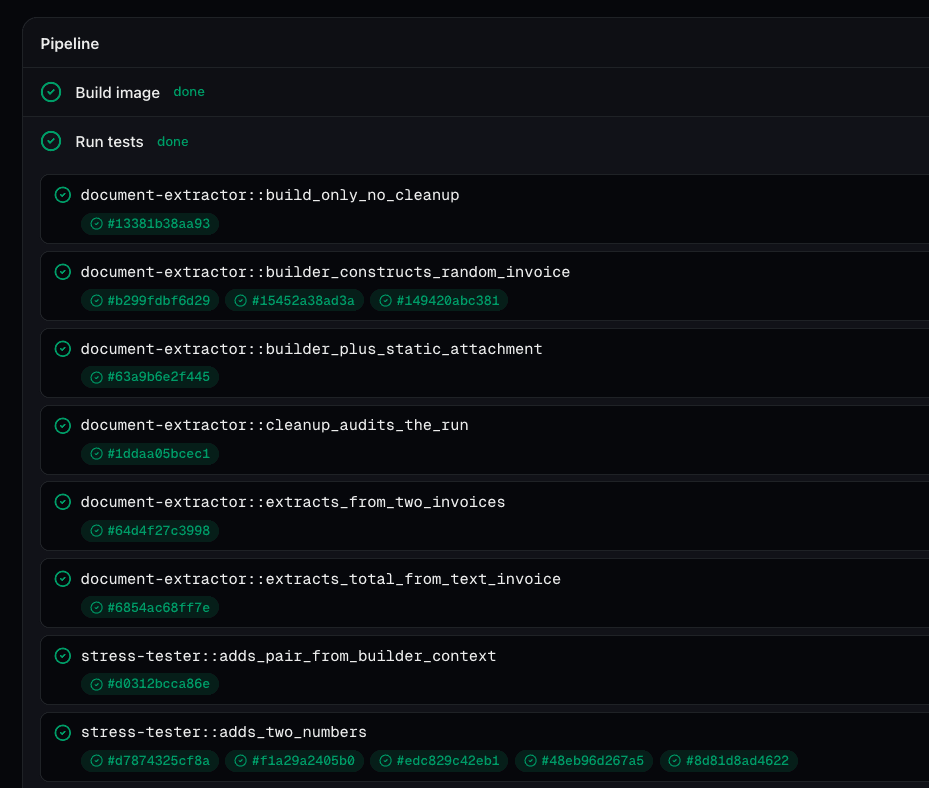
Assertions That Match How Agents Actually Work
A string-equality check on the agent's final output is almost never the right assertion. Connic Tests provides four assertion shapes, and each one is an expression, not a hardcoded comparator.
output, error, and status. Write output.total > 0, output.status == "refunded", or any other safe expression. JSON payloads are parsed automatically.math.calculator.add: invocations >= 5 asserts on the call count. Catches the silent regression where an agent stops using a tool required by the workflow.expected_result is omitted, the run still has to reach the completed status to pass. A free, baseline “did it crash?” check on every case.assertEquals, assertContains) cap the possible questions. Expressions do not. Anything computable over the output object (numeric comparisons, length checks, nested keys, set membership) is already a valid assertion. Same engine that powers Connic's trace filters, evaluated safely server-side.Multimodal Fixtures Without the Setup
Half of the agents people deploy today read PDFs, parse invoices, OCR receipts, or describe images. Their tests should too. Drop a binary in tests/files/ and reference it by name. The runner base64-encodes it and delivers a multimodal payload to the agent.
tests:
  - name: extract_invoice_total
    payload: "Extract the total amount from this invoice."
    files:
      - invoice_a.pdf
      - invoice_b.pdf
    runs: 5
    success_threshold: 100
    expected_result: output.total > 0 and output.currency == "EUR"
Five runs, each receiving both PDFs alongside the prompt, with a strict expectation that every single one returns a positive Euro total. No mocking. No stubs. Real model calls against real fixtures.
Dynamic Builders for Stateful Tests
Some tests cannot be static. A refund agent test must create a real charge first. An updater test must seed a real row. Dynamic builders are small Python modules in tests/builders/ that produce the test payload at run time and tear down the fixture afterwards.
import stripe

def build(context, builder_args, test_name, payload, files):
    """Create a real Stripe charge, then ask the agent to refund it."""
    charge = stripe.Charge.create(
        amount=builder_args["amount_cents"],
        currency="usd",
        source="tok_visa",
    )
    # stash state for cleanup() to read back
    context["charge_id"] = charge.id
    return f"Please refund charge {charge.id} for the customer."

def cleanup(run, context, builder_args):
    """Runs after the agent finishes (pass OR fail)."""
    charge_id = context.get("charge_id")
    if charge_id:
        # ensure the fixture is gone even if the agent forgot
        try:
            stripe.Refund.create(charge=charge_id)
        except stripe.error.InvalidRequestError:
            pass  # already refunded by the agent under test
return None # returning False would mark the case failedtests:
- name: refunds_a_real_charge
builder: create_charge_then_refund
builder_args:
amount_cents: 4200
expected_result: output.status == "refunded"
expected_tool_calls:
- stripe.refund.create
expected_no_tool_calls:
- email.sendThe builder creates state, the agent operates on it, the assertion verifies behavior, and the cleanup hook tears down the fixture, even if the test failed. Builders run inside the same sandbox as the agent, so they see the same environment, the same secrets, and the same tools.
False from cleanup() additionally fails the case. This is useful when teardown itself reveals a bug (e.g. the agent didn't actually refund the charge it claimed to). Every other return value is treated as success.Mock Side Effects, Keep the Reasoning
Builders test against real state. Mocks do the opposite: they exercise the agent's reasoning without letting selected custom code actually run. No row written, no email sent, no third-party charge. Drop a Python module in tests/mocks/ and point a case at it with the mocks field.
from connic import GuardrailResult

# Replace one custom file tool result.
def mock_data_customer_add_customer(tool_name, params, context):
    return {"id": "cust_test_1", "name": params.get("name")}

# Replace middleware and one exact before-hook phase.
def middleware_before(content, context):
    return content

def mock_data_customer_add_customer_hook_before(tool_name, params, context):
    return params

# Replace only this custom input guardrail.
def guardrail_input_domain_check(content, context):
return GuardrailResult(passed=True)tests:
- name: adds_a_customer_without_touching_the_db
payload: '{"name": "Ada"}'
mocks: customer_mocks
strict_mocks: true
strict_hook_mocks: true
strict_middleware_mocks: true
strict_guardrail_mocks: true
# The add_customer call is served by the mock but still recorded,
# so the assertion holds while nothing ever reaches a real datastore.
expected_tool_calls:
- data.customer.add_customer: params.name == "Ada"
expected_result: output.id == "cust_test_1"Tool replacements use a hierarchy from the exact function (mock_data_customer_add_customer), to its module (mock_data_customer), to its namespace (mock_data), to a catch-all mock. The same module can replace middleware_before / middleware_after, hierarchical hook phases ending in _hook_before / _hook_after, and custom guardrails. A matching function replaces that phase; by default, no match runs the real code. Built-in guardrails, predefined tools, and api: tool implementations always run for real.
expected_tool_calls and expected_no_tool_calls keep asserting on what the agent reached for, while the configured return value stands in as the result.strict_mocks: true (per file or per case) and the run fails before an unmocked custom file tool executes. This contract is tool-only. Turn on strict_hook_mocks, strict_middleware_mocks, or strict_guardrail_mocks independently to fail before an unmatched configured eligible real lifecycle phase executes. All three default to false; missing phases and built-in guardrails are exempt.Tests Are a Deployment Gate, Not a Vibe Check
Tests that run on a developer's laptop and nowhere else are a comfort, not a control. Connic Tests is wired directly into the deployment pipeline:
During every normal deployment, Connic discovers the test suites in the Project, expands each case according to its runs count, and executes them in an isolated runner. If any case misses its threshold, the deployment stops before production. connic deploy --skip-tests is a deliberate CLI hotfix escape hatch; Git auto-deploys cannot bypass the gate.
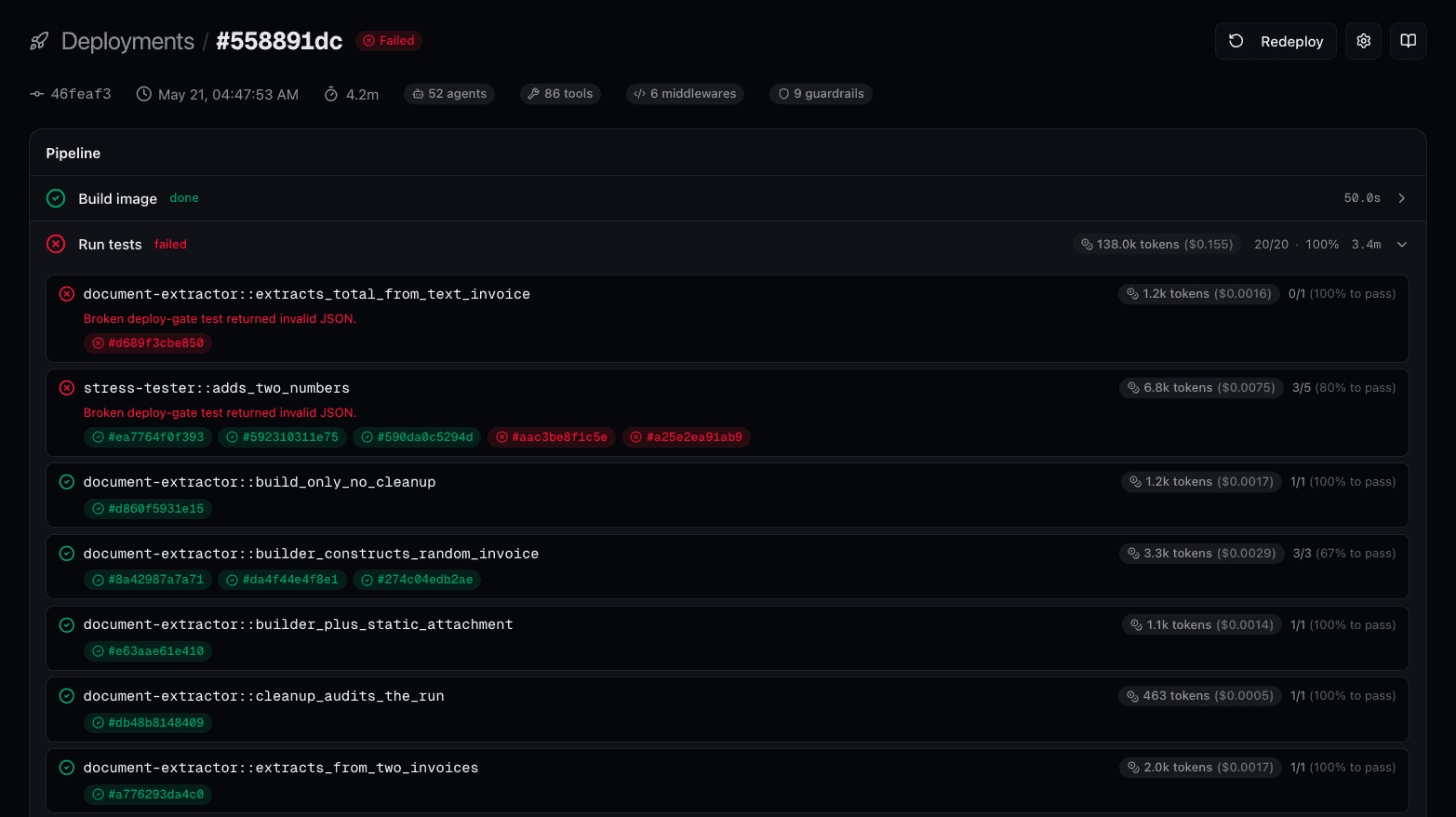
connic test executes the same framework against the current environment and streams results back to the terminal.Real-World Patterns
expected_tool_calls: warehouse.query: invocations >= 1 to every test case. Future model swaps that re-introduce the bug fail the deployment automatically.expected_no_tool_calls: email.send. A regression that adds an “helpful” confirmation email is caught at deploy time, not in a customer complaint.How It Fits the Rest of the Platform
Connic Tests is the deterministic, pre-production gate. It sits alongside two other quality systems on the platform:
| System | When It Runs | What It Answers |
|---|---|---|
| Connic Tests | During deployment | Does this build pass the defined contract? |
| LLM Judges | After every (or sampled) production run | How is quality trending against the rubric? |
| A/B Testing | Across two live variants | Which version performs better on real traffic? |
Tests catch regressions before they ship. Judges score the runs that do ship. A/B testing decides between two versions that both passed. Together, all three create a proper feedback loop instead of a hope-driven release process.
Getting Started
Adding tests to an existing agent is a five-minute exercise:
Create a
tests/directory in the Project root, next toagents/Add
tests/<agent-name>.yamlwith one or two cases. Start withruns: 1for fast feedbackRun
connic testlocally and watch the cases stream inPush and deploy. The same suite now gates production. Crank
runsup on the cases that matter most
For the full schema reference (every field, every default, every expression binding) see the Testing documentation. Teams new to our platform can start with the quickstart guide to deploy a first agent, then gate it with a test that fails before customers encounter the regression.