
The AI agent demo impressed everyone in the stakeholder meeting. The CEO is excited. The product manager is already writing the press release. There's just one small problem. That polished Jupyter notebook isn't going to survive first contact with real users.
The gap between "it works on my machine" and "it works for 10,000 users at 3am on a Saturday" is where most AI agent projects go to die. This guide is about crossing that gap without turning production into a permanent debugging exercise.
The Prototype-to-Production Gap
An AI agent prototype usually has these constraints:
- Single-threaded execution (one request at a time)
- No error handling (if it fails, restart the notebook)
- API keys hardcoded in cells
- No logging (print statements don't count)
- Unlimited timeouts (the notebook just sits there)
- No cost tracking (surprise $500 OpenAI bills)
This is fine for demos. It's catastrophic for production.
Deployment, scaling, observability, and connectors are handled, so a prototype becomes a product without the rebuild.
Get started freeThe Production Checklist
These requirements need attention before an agent faces real users. Missing any of them means debugging in production.
1. Isolated Execution Environments
Each agent run must be fully isolated. Runs share neither state nor global variables, so one request cannot depend on context left by another.
2. Retry Logic with Exponential Backoff
LLM APIs fail, rate limits hit, networks blip. An agent needs to handle that gracefully, not crash and burn.
version: "1.0"
name: resilient-agent
description: "A resilient assistant with retry handling"
model: connic/gpt-5.6-terra
system_prompt: |
  You are a helpful assistant.
retry_options:
  attempts: 3      # Total attempts, including the first (1-10)
  initial_delay: 10
  max_delay: 30    # Max seconds between retries
With sane retry configuration, transient failures become non-events instead of pager alerts.
3. Timeout Handling
What happens when an agent takes too long? In a prototype, the operator waits. Production needs defined behavior.
- •Request timeout: Maximum time for the entire run (prevents runaway costs)
- •Tool timeout: Maximum time for individual tool calls
- •Graceful degradation: Return partial results rather than nothing
4. Concurrency Control
What happens when 100 users hit an agent simultaneously? Without concurrency control:
- →Rate limits hit immediately
- →Memory exhaustion
- →Unpredictable response times
- →Cost spikes
Production systems need per-agent concurrency limits, request queuing, and fair scheduling.
5. Observability (The Non-Negotiable)
Without visibility into an agent's behavior, debugging failures is guesswork. Failures are inevitable in production.
Production observability means:
- •Run history: Every execution logged with status, duration, and trigger source
- •Execution traces: Step-by-step breakdown of LLM calls, tool invocations, reasoning
- •Token tracking: Input and output tokens per run, per LLM call
- •Error categorization: Is it a tool failure? Rate limit? Timeout? Bad input?
Integration Patterns for Scale
How agents are triggered matters as much as how they are built. The patterns below hold up at scale.
Async-First Architecture
The tempting move is to build synchronous APIs: user sends request, waits for response. That works until:
- →Agent processing takes 30 seconds and the load balancer times out
- →Users refresh and create duplicate requests
- →Web servers are blocked waiting on LLM responses
The solution: accept → queue → process → callback.
1. User submits request
   → API returns immediately with request_id

2. Request triggers agent via webhook/queue
   → Agent processes asynchronously

3. Agent completes
   → Results delivered via outbound connector
   → Webhook callback to the originating system
   → Or direct database write

4. User polls or receives push notification
   → Results displayed in UI
When Sync Makes Sense
Synchronous patterns do have their place:
- •Chat interfaces: Users expect immediate, streaming responses
- •Simple lookups: Quick queries that complete in <5 seconds
- •Blocking workflows: When the user cannot proceed without the result
For these, use WebSocket connections for streaming responses and set aggressive timeouts.
A Complete Production Example
The following real-world example brings the pieces together: a document processing pipeline that extracts data from uploaded invoices.
version: "1.0"
name: invoice-extractor
description: "Extracts structured data from invoices"
model: connic/gemini-3.7-flash
system_prompt: |
  You are an invoice processing specialist. Extract structured
  data from invoice images and documents.

  Always extract: vendor name, invoice number, date, line items,
  subtotal, tax, and total. If a field is unclear, mark it as
  "unclear" rather than guessing.
tools:
  - documents.parse_pdf
  - documents.extract_text_from_image
  - validation.verify_totals
output_schema: invoice # References schemas/invoice.jsonversion: "1.0"
name: invoice-pipeline
type: sequential
description: "Complete invoice processing: extract, validate, store"
agents:
- invoice-extractor
- invoice-validator
- invoice-storerThis pipeline:
- 1.Triggers when a file is uploaded to S3
- 2.Extracts structured data with confidence scoring
- 3.Validates the extracted data (math checks, format validation)
- 4.Stores results and notifies downstream systems
Each step is traced, tokens are counted, and transient failures retry at the failing model-request or operation boundary with exponential backoff.
Deployment Strategy
Production deployments should be boring. No manual steps, no "deploy on Friday and pray."
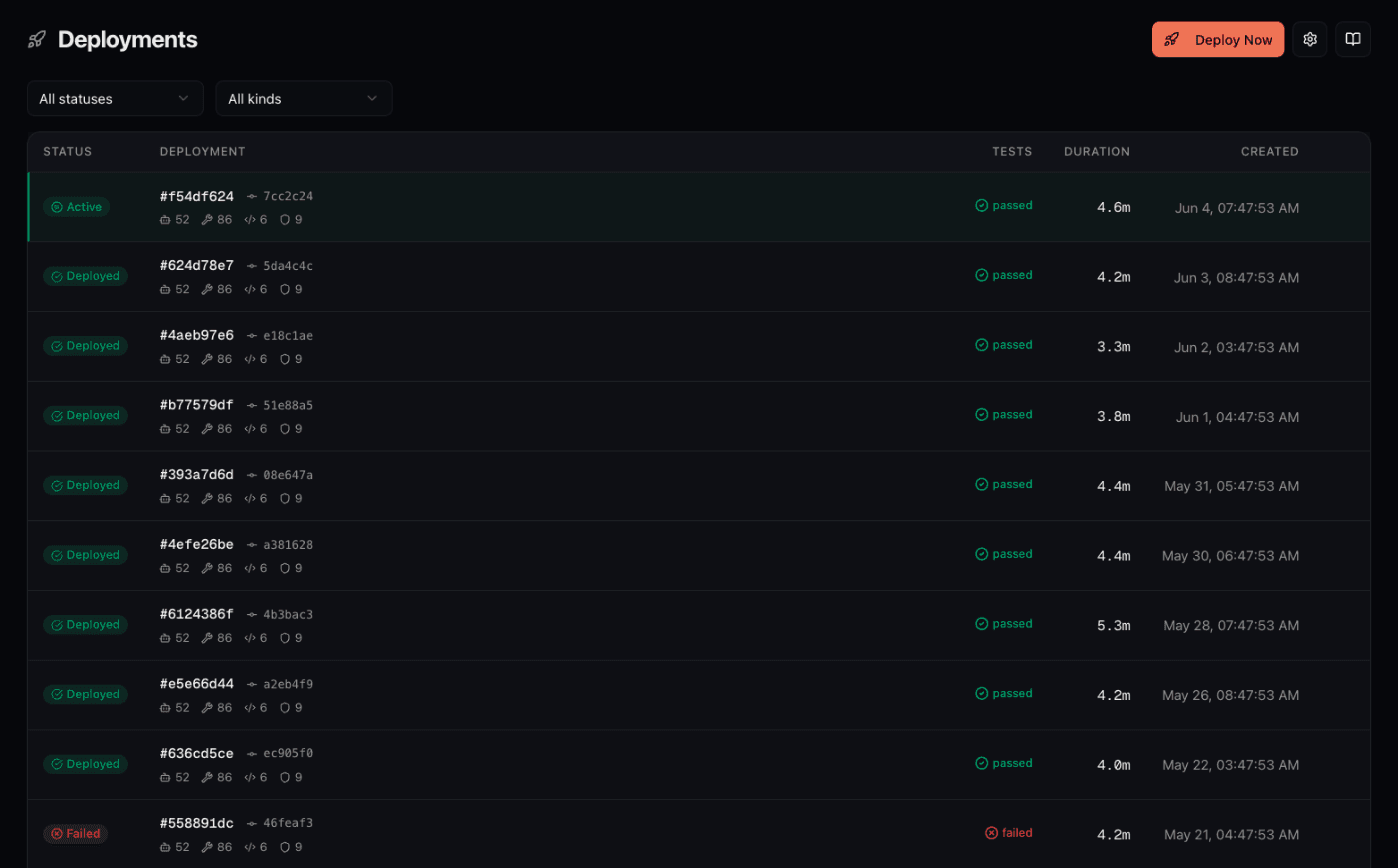
Git-Based Workflow
# Make changes
$ vim agents/invoice-extractor.yaml

# Test locally with hot-reload
$ connic test

# Commit and push
$ git add .
$ git commit -m "Improve extraction accuracy for handwritten invoices"
$ git push origin main

# Deployment happens automatically
# Dashboard shows build progress and deployment status
Rollback in Seconds
Every deployment is versioned. If something goes wrong:
- →Click "rollback" in the dashboard
- →Previous version is live immediately
- →Debug the issue without production pressure
Production Readiness Check
The gap between prototype and production is real, but it doesn't have to be painful. A platform can handle these production concerns:
- ✓Isolated execution environments (automatic)
- ✓Retry logic and timeout handling (configured, not coded)
- ✓Concurrency control (per-agent limits)
- ✓Full observability (built-in from day one)
- ✓Instant rollbacks (click a button)
A platform can handle operations while the team focuses on the agent's purpose. For teams still evaluating options, the 2026 AI agent deployment platform comparison covers the main tradeoffs.
The quickstart guide covers the initial setup, while the observability features show what production-grade monitoring looks like.