
A developer would not ship a web application without authentication, input validation, and rate limiting. But many teams ship AI agents with none of the equivalent safeguards. The agent works in the demo, so it goes to production. Then the first creative user discovers they can make it do things it was never supposed to do.
The checklist covers the controls required to secure AI agents before they go live and how to implement them.
The Threat Model for AI Agents
AI agent security isn't theoretical. The OWASP Top 10 for Agentic Applications 2026 expands the threat model beyond model output to goal hijacking, tool misuse, privilege abuse, memory and context poisoning, and cascading failures. These risks grow when an agent can act across systems with a user's identity or persistent context.
Securing an agent starts with understanding the relevant threats. These attacks occur in production:
2026 ENISA threat update
Published on 22 September 2026, the ENISA Threat Landscape 2026 analyses incidents and events observed from 1 January to 31 December 2025.
ENISA’s summary reports that 73% of targeted organisations were classified as NIS2 essential or important entities. The report’s sectoral analysis expresses that share as recorded events. This describes the 2025 incident dataset, not the proportion of all NIS2 entities attacked or the proportion of attacks involving AI.
The report describes attackers using AI to augment existing skills during 2025. Looking ahead, ENISA expects emerging AI models to increasingly support malicious operations. Its AI outlook is a forecast of greater automation, speed, and scale. Operators in critical sectors can prepare by limiting what an agent can reach, gating consequential actions, and rehearsing how to contain a compromised workflow.
Isolation, secrets management, guardrails, and audit logging are built into the platform.
Get started freeThe Production Safety Checklist
These security controls should be in place before an agent faces real users. Each one below comes with specific implementation guidance.
1. Block Prompt Injection on Input
Every user message should be checked for injection attempts before the agent processes it.
Effective prompt injection detection goes beyond keyword matching. It needs to catch:
- →Direct instruction overrides: "Ignore previous instructions" and variants
- →Encoding attacks: Base64-encoded instructions, hex-encoded payloads
- →Character manipulation: typoglycemia (scrambled characters), Unicode substitution
- →Structural attacks: delimiter injection, context manipulation through formatting
guardrails:
  input:
    - type: prompt_injection
      mode: block
      config:
        sensitivity: medium  # low, medium, or high
When a prompt injection is detected, the agent never executes. The user receives a rejection message, and the attempt is logged as a trace span for security review.
provider field in the guardrail config.2. Handle PII Before It Reaches the Model
Users will paste sensitive data into an agent. The question is whether the data reaches the model provider's API or gets intercepted first.
Three modes are available:
[EMAIL_REDACTED]. The agent processes the sanitized input. Best balance of safety and usability.guardrails:
input:
- type: pii
mode: redact
config:
entities: [email, phone, ssn, credit_card, api_key]
output:
- type: pii_leakage
mode: redactNotice the output guardrail. PII can also appear in agent responses, even if it wasn't in the original input. If an agent has access to customer data through tools or retrieval bases, output PII detection keeps it from surfacing sensitive information in responses.
3. Prevent System Prompt Leakage
A system prompt contains the agent's personality, business rules, tool schemas, and operating instructions. If an attacker extracts it, they have a blueprint for manipulating the agent.
guardrails:
  output:
    - type: system_prompt_leakage
      mode: block
This checks every agent response for fragments that match the system prompt. If the agent starts revealing its instructions, the response is blocked and replaced with a safe message.
4. Restrict the Agent to Its Lane
Language models will happily answer questions about anything. A billing support agent shouldn't be giving cooking advice or medical recommendations. Topic restriction keeps the agent focused on what it's supposed to do.
guardrails:
  input:
    - type: topic_restriction
      mode: block
      config:
        allowed_topics:
          - billing and payments
          - subscription management
          - account settings
        off_topic_message: "I can only help with billing and account questions."
        model: connic/gpt-5.6-luna
The configuration can define allowed topics (whitelist) or blocked topics (blacklist), depending on the use case. The check uses a lightweight LLM call for classification, which is why it takes a model parameter. Use a fast, cheap model to keep latency and cost low.
5. Moderate Output Content
Even with a good system prompt, language models can generate inappropriate content. Content moderation on output catches toxicity, harassment, hate speech, and other policy violations before they reach the user.
guardrails:
  output:
    - type: moderation
      mode: block
      config:
        categories:
          - hate
          - harassment
          - violence
          - self_harm
6. Detect Data Exfiltration Attempts
A subtle but dangerous attack: prompts that cause the agent to encode sensitive data into URLs, markdown images, or structured output that gets sent to external servers. This is especially dangerous for agents with access to internal data through tools.
guardrails:
  output:
    - type: data_exfiltration
      mode: block
      config:
        allowed_domains:
          - yourdomain.com
          - docs.yourdomain.com
This catches suspicious URLs with encoded data in query parameters, markdown image tags pointing to external domains, and base64-encoded data blocks in the response. The allowed domains whitelist ensures legitimate references are not blocked.
7. Add Custom Business Rules
Every business has unique safety requirements that built-in guardrails can't cover. Custom guardrails support arbitrary validation logic in Python.
from connic import GuardrailResult

REQUIRED_DISCLAIMERS = [
    "not financial advice",
    "consult a professional",
]

def check(content: str, context: dict) -> GuardrailResult:
    """Ensure financial responses include disclaimers."""
    agent_name = context.get("agent_name", "")
    if "finance" not in agent_name:
        return GuardrailResult(passed=True)

    content_lower = content.lower()
    has_disclaimer = any(d in content_lower for d in REQUIRED_DISCLAIMERS)

    if not has_disclaimer:
        return GuardrailResult(
            passed=False,
            message="Response must include a disclaimer.",
        )
    return GuardrailResult(passed=True)
Common custom guardrails include: competitor mention blocking, regulatory compliance disclaimers, internal terminology filters, and domain-specific validation rules.
8. Check Output Relevance
Sometimes an agent responds without saying anything harmful, but also without answering the actual question. Relevance checking catches goal hijacking (where an attacker subtly redirects the agent's purpose) and hallucinated tangents.
guardrails:
  output:
    - type: relevance
      mode: warn
      config:
        model: connic/gpt-5.6-luna
Start with warn mode to understand how often irrelevant responses occur, then escalate to block mode if the rate is unacceptable.
9. Scope Tools and Gate High-Impact Actions
Expose only the tools a workflow needs. Restrict built-in database tools to approved collections and read/write operations, and limit retrieval tools to the required namespaces. A permitted retrieval namespace also grants access to its descendants. Custom tools need their own authorization checks and narrowly scoped external credentials. Keep production credentials separate from test credentials through environment-scoped variables.
Configure approval gates for actions such as deletions, payments, or changes to access rights. Only configured tools pause for approval; other tools execute normally. Review the proposed tool and parameters, and restrict decisions to designated members with approvals.decide permission. With on_rejection: fail, a rejection or timeout fails the run. With on_rejection: continue, the rejected tool is skipped but the agent can pursue another action. Test that behavior against the workflow’s allowed alternatives.
Putting It All Together
A complete guardrail configuration for a production customer support agent:
version: "1.0"
name: customer-support
model: connic/gpt-5.6-terra
system_prompt: |
  You are a customer support agent for Acme Corp.
  Help customers with orders, billing, and product questions.
tools:
  - support.search_orders
  - support.search_retrieval
  - support.create_ticket

guardrails:
  input:
    - type: prompt_injection
      mode: block
      config:
        sensitivity: medium
    - type: pii
      mode: redact
      config:
        entities: [email, phone, ssn, credit_card]
    - type: topic_restriction
      mode: block
      config:
        allowed_topics: [orders, billing, products, returns]
        off_topic_message: "I can only help with Acme Corp products and orders."
        model: connic/gpt-5.6-luna
  output:
    - type: moderation
      mode: block
    - type: system_prompt_leakage
      mode: block
    - type: pii_leakage
      mode: redact
    - type: data_exfiltration
      mode: block
      config:
        allowed_domains: [acmecorp.com]
    - type: relevance
      mode: warn
      config:
model: connic/gpt-5.6-lunaObservability: See What Is Being Caught
Run traces show guardrail evaluations alongside tool calls and errors. The separate project audit log records team actions, including approval decisions. Incident review needs both the execution record and the decisions that allowed an action to proceed.
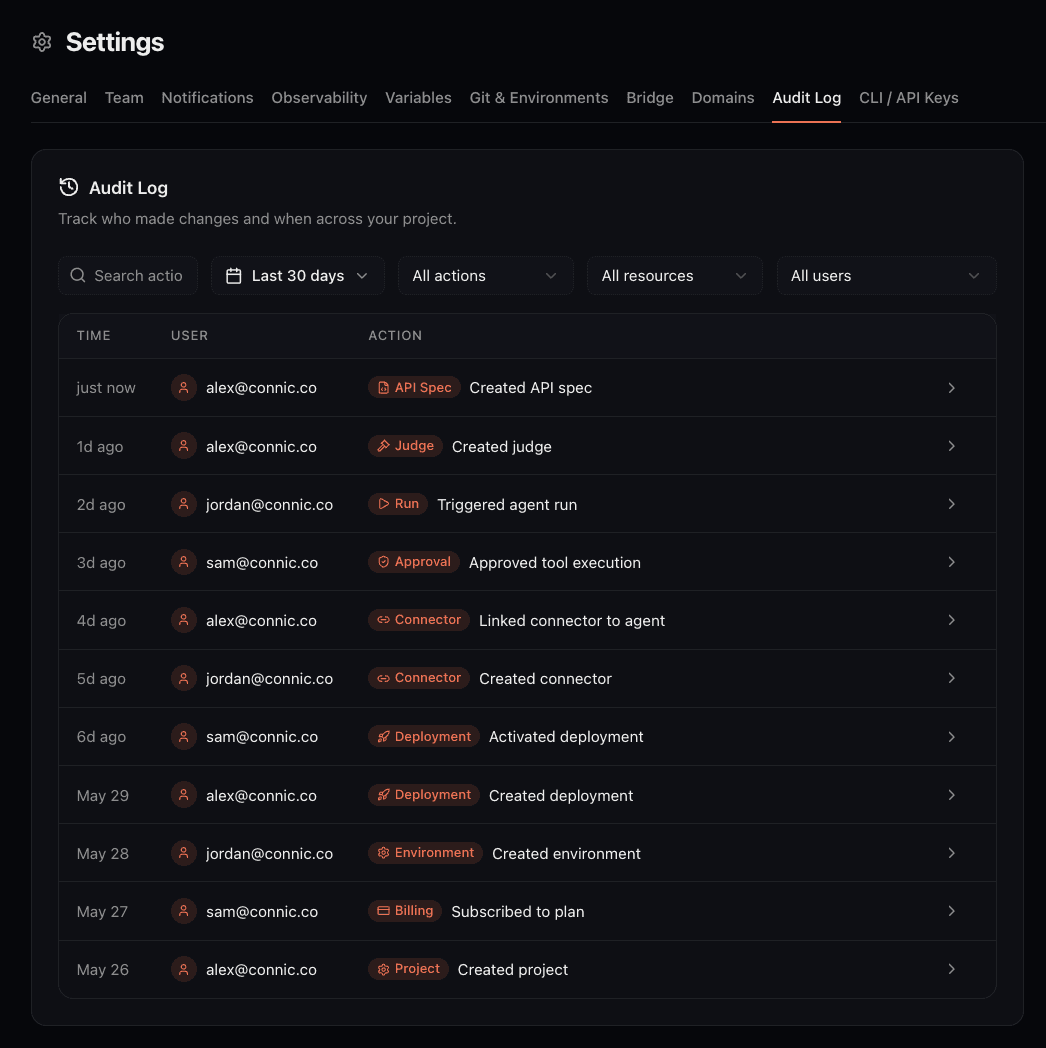
The logging and debugging documentation explains how to inspect traces and custom-code logs. Capture is limited to 500 custom-code log lines per run; additional lines are dropped. Configure run retention and preserve incident evidence before runs are deleted. Environment redaction rules cover selected JSON fields in new records; they leave plain-text secrets and existing history unchanged. Avoid writing credentials into logs.
This data answers questions such as: How often is prompt injection attempted? Which agents trigger the most PII redactions? Are topic restrictions too aggressive? Guardrails can then be tuned from real traffic patterns instead of guesswork.
Beyond Guardrails: Defense in Depth
Guardrails are the runtime safety layer. But a complete security posture includes additional controls:
Critical-Sector Pre-Launch and Response Checklist
For workflows supporting essential services, the launch review should include a tested procedure for containing incidents and restoring service. These operational checks supplement the guardrail configuration above; they do not establish NIS2 compliance.
Before launch
- List reachable systems, permitted data, tool operations, and credentials. Verify that access to unrelated collections, namespaces, and environments is denied, including through custom tools.
- Test each consequential tool call with approval, rejection, and timeout. Confirm that reviewers see enough context and that an alternative tool cannot bypass the intended gate.
- Trace a test action from input through tool arguments and approval to its external result. Verify log access, JSON redaction, retention, and the procedure for preserving incident records.
- Assign an incident owner and rehearse stopping new requests, cancelling active work, revoking credentials, and restoring a known-good deployment. Keep a manual service procedure available while the agent is unavailable.
When an incident is suspected
- Stop new requests at their sources and pause affected connectors. Use the run cancellation controls for scheduled, queued, or running executions. Cancellation is not instantaneous and cannot reverse completed external actions.
- Revoke affected credentials at the external provider before resolving pending approvals. Rejection with
on_rejection: continuecan resume the run, so keep its access to affected systems revoked during investigation. - Preserve run IDs, traces, approval decisions, project audit records, and external-system records. Record the affected data and actions, and involve the organisation’s incident-response and compliance owners to assess notification duties.
- Correct the access rule, approval gate, or tool behavior that failed. Reproduce the incident safely in an isolated test environment and verify the fix. Update environment variables and redeploy before resuming traffic; editing a variable does not update an existing deployment.
Getting Started
For a new implementation, the recommended approach is:
Start with the baseline. Add
prompt_injectionandpiion input,moderationandsystem_prompt_leakageon output. This covers the most common attack vectors.Tune in a test environment. Use warn mode with non-sensitive test inputs to inspect detections. Enable the required blocking and redaction controls before exposing production data or consequential tools.
Layer up based on traffic. Once real usage patterns are visible, add topic restriction, relevance checking, and custom guardrails based on the observed risks.
Review trace data regularly. Check which guardrails fire most often and investigate patterns. Adjust sensitivity and modes as the traffic becomes better understood.
The Guardrails documentation provides the full configuration reference. Our real-time guardrails guide describes the built-in types in more detail.