
Connic Approvals pause an agent for human review or missing input. Consider an agent that deletes customer records after receiving an incorrect ID. The tool call can be valid even when the input is wrong. A human review before execution gives someone a chance to catch the mistake. Other workflows need a person to supply a missing value, such as an MFA code, before the agent can continue.
This is the reality of running AI agents in production. They're fast, autonomous, and increasingly capable. But autonomy without oversight is a liability. The more powerful agents become, the more critical it is to keep a human in the loop for actions that can't be undone.
Connic Approvals solve this. When an agent reaches a sensitive tool call, execution pauses. A human reviews the action and its parameters, approves or rejects it, and the run resumes or stops according to its rejection policy. For an input request, the human supplies text that becomes the tool result. Saved conversation and tool state let the run continue without repeating completed tool calls.
Why Agents Need Human-in-the-Loop
AI agents aren't traditional software. They make decisions based on probabilistic reasoning. The same input can lead to different tool calls across runs. A perfectly written prompt doesn't guarantee a perfectly executed action every time. Unlike a REST API that returns a 400 error, an agent with access to a delete endpoint will use it if it believes that's the right thing to do.
| Operation Type | Examples | Why It Needs Oversight |
|---|---|---|
| Destructive | Deleting records, canceling subscriptions, revoking access | A mistaken call can remove data or access that the workflow still needs. |
| Financial | Processing refunds, transferring funds, modifying billing | When money moves, a human should verify the amount and recipient first. |
| External | Sending emails, posting to third-party APIs, triggering webhooks | External effects may be difficult to reverse after the call completes. |
| Compliance | Actions under EU AI Act, GDPR, or industry-specific rules | Human-oversight requirements depend on the system and the rules that apply to it. |
Connic Approvals place the review step where the workflow needs it. Ungated tool calls run without approval. Configured gates pause and wait for a human decision, so teams can require review for selected actions.
Choose which actions need review and which values a person must supply. Connic handles the pause and resumption.
Try Connic freeHow It Works
The approval flow is built into the agent execution pipeline. When a gated tool is called, the runner pauses execution, creates an approval request, notifies the team, and waits. The conversation history and agent state are preserved. When the decision and rejection policy allow the run to continue, the agent resumes from the saved state. Successive approval and rejection decisions persist when ordinary runs and deployment-gate tests resume, including later updates for the same input tool.
If approved, the tool executes with the exact parameters that were reviewed. For a generated input tool, the human response becomes the tool result instead. Every subsequent tool call proceeds normally unless it hits another gated tool or input request.
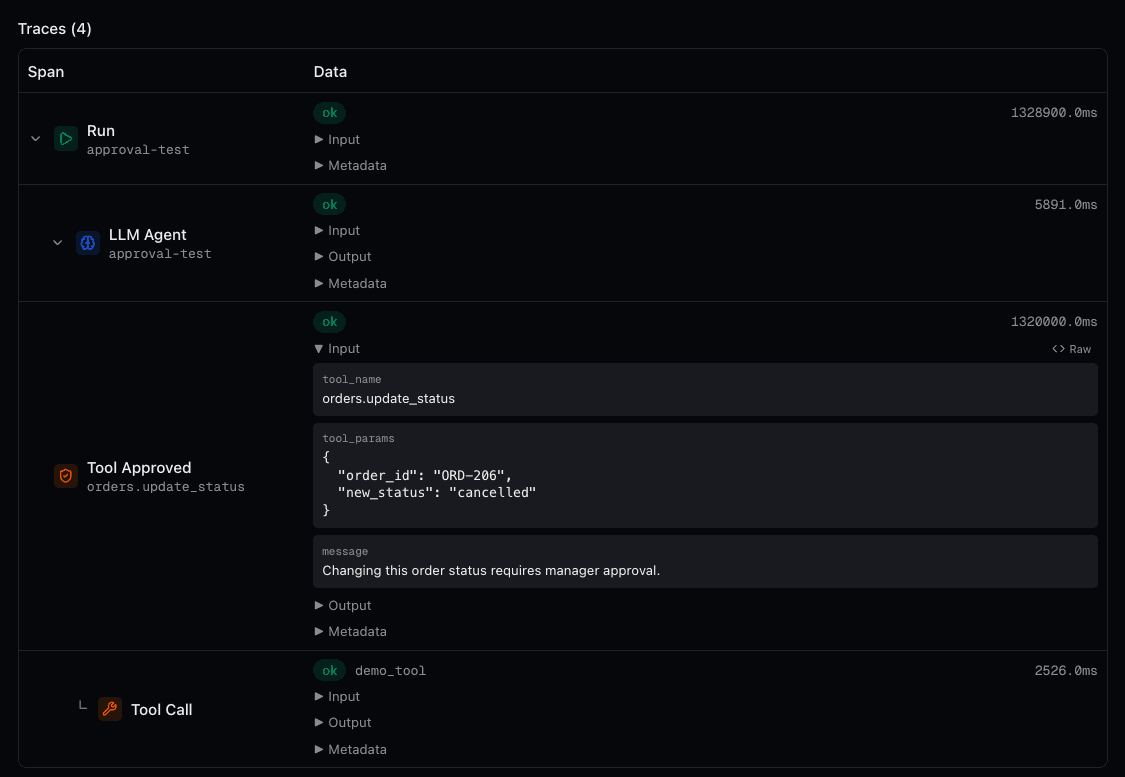
If rejected, the default behavior terminates the run with an error message that includes the rejection reason when provided. The gated tool does not execute. Alternatively, set on_rejection: continue and the agent receives the rejection as a tool response. It can then adapt: inform the user, try a different approach, or skip the action entirely. Either way, the reviewer can provide context on why the action was denied, which is logged for audit purposes.
If nobody responds, a configurable timeout keeps the run from hanging indefinitely. After the timeout expires, the run fails safely with a clear timeout error. Or, with on_rejection: continue, the agent resumes and treats the timeout as a rejection. The default timeout is 1 hour, but it can be changed to match the workflow.
Configuration
Approvals are declared in the agent's YAML configuration. The configuration defines which tools require approval, an optional timeout, and a message that gives reviewers context about why this action needs human oversight.
version: "1.0"
name: order-processor
model: connic/gpt-5.6-terra
description: "Processes customer orders and handles refunds"
system_prompt: |
  You handle incoming customer orders...
tools:
  - orders.process
  - orders.delete_order
  - orders.process_refund
  - inventory.check

approval:
  tools:
    - orders.delete_order
    - orders.process_refund
  timeout: 600
  message: "This order action requires manager approval before execution."
In this example, orders.process and inventory.check run without approval. But when the agent calls delete_order or process_refund, the run pauses and waits up to 10 minutes for a human decision.
By default, rejected approvals terminate the run. To let the agent adapt instead, set on_rejection: continue. The tool call returns a rejection message and the agent can try an alternative approach or inform the user. See the rejection behavior docs for details.
Conditional Approvals
Not every refund needs approval. A $5 refund is routine. A $5,000 refund needs a second pair of eyes. Conditional approvals use expressions to determine when a tool call requires review, based on the actual parameters being passed or the context of the request.
approval:
  tools:
    # Always require approval for deletions
    - orders.delete_order

    # Only require approval for refunds over $50 from non-admin users
    - orders.process_refund: param.amount > 50 and not context.is_admin

    # Only require approval for bulk operations
    - inventory.bulk_update: param.count > 100
  timeout: 600
  message: "High-value action detected. Please review before proceeding."
Conditions have access to two data sources: param.* for the tool's parameters and context.* for values from middleware. Approvals can depend on amounts, user roles, resource types, or other business logic. If the condition evaluates to false, the tool executes without approval. If it evaluates to true, approval is required. If the condition cannot be evaluated, for example because a parameter is missing, Connic requires approval.
Human Input as a Tool Result
An approval gate reviews an action the agent is ready to take. An input request collects information it still needs, such as an MFA code, a purchase-order number, or confirmation text. On an LLM agent, approval.inputs generates a named tool without a Python function or an additional top-level tools entry. The agent receives the human response as that tool's result.
approval:
  inputs:
    - get_mfa:
        prompt: Request the current MFA code when sign-in requires it.
        params:
          - reason: str
          - account_email: str
        label: MFA code
        sensitive: true
  timeout: 300
  on_rejection: fail
prompt tells the model when to request input; label names the field shown to the reviewer. Here the agent supplies reason and account_email as context above the response field. Parameters support str, int, float, and bool. Every declared parameter is required, extra arguments are rejected, and an input without params takes no arguments. These types describe the request context; the human response is always text.
Input names must be unique ASCII identifiers of at most 64 characters and cannot collide with configured tools or reserved discovery names. They count toward the 100-tool agent limit. The approval reference covers the naming and parameter rules. Parameters are visible context, so credentials belong in the response field.
In the dashboard, an input request offers Provide response and Submit and continue. Through the API, approve a request with a response_label by sending a nonblank response to POST /projects/{project_id}/approvals/{approval_id}/decide:
{"status": "approved", "response": "001234"}Leading zeros and surrounding whitespace in a nonblank response are preserved. The reason field is decision commentary. Ordinary approvals and rejections omit response, and expired input requests cannot accept a late response. A label asking for specific confirmation text does not validate that phrase; the workflow still needs to check the supplied value. Each later input request needs its own response.
Sensitive Responses, Storage, and Logs
Connic encrypts submitted responses in the approval record. With sensitive: true, the dashboard also masks the input, Connic encrypts affected run and session data, and captured logs and traces replace the literal response with [REDACTED]. Without the sensitive flag, the field shows visible text and the extra redaction does not apply.
The model still receives the response as a tool result. Literal redaction does not cover transformed copies or data sent by custom tools to external systems. The Browser Automation Demo uses a sensitive password request for this pattern. A check with a disposable test value should inspect the masked request and the recorded logs and traces after resumption; a masked field alone does not prove the literal is absent from the recorded run.
Notifications That Reach the Right People
Connic can notify project members and configured project channels when an approval request arrives. The delivery depends on member preferences and channel routing:
Project-channel routing can select specific agents; member preferences control personal notifications. Routing does not grant permission to decide. Viewing requests requires approvals.view, decisions require approvals.decide, and routing configuration requires approvals.configure.
Full Audit Trail
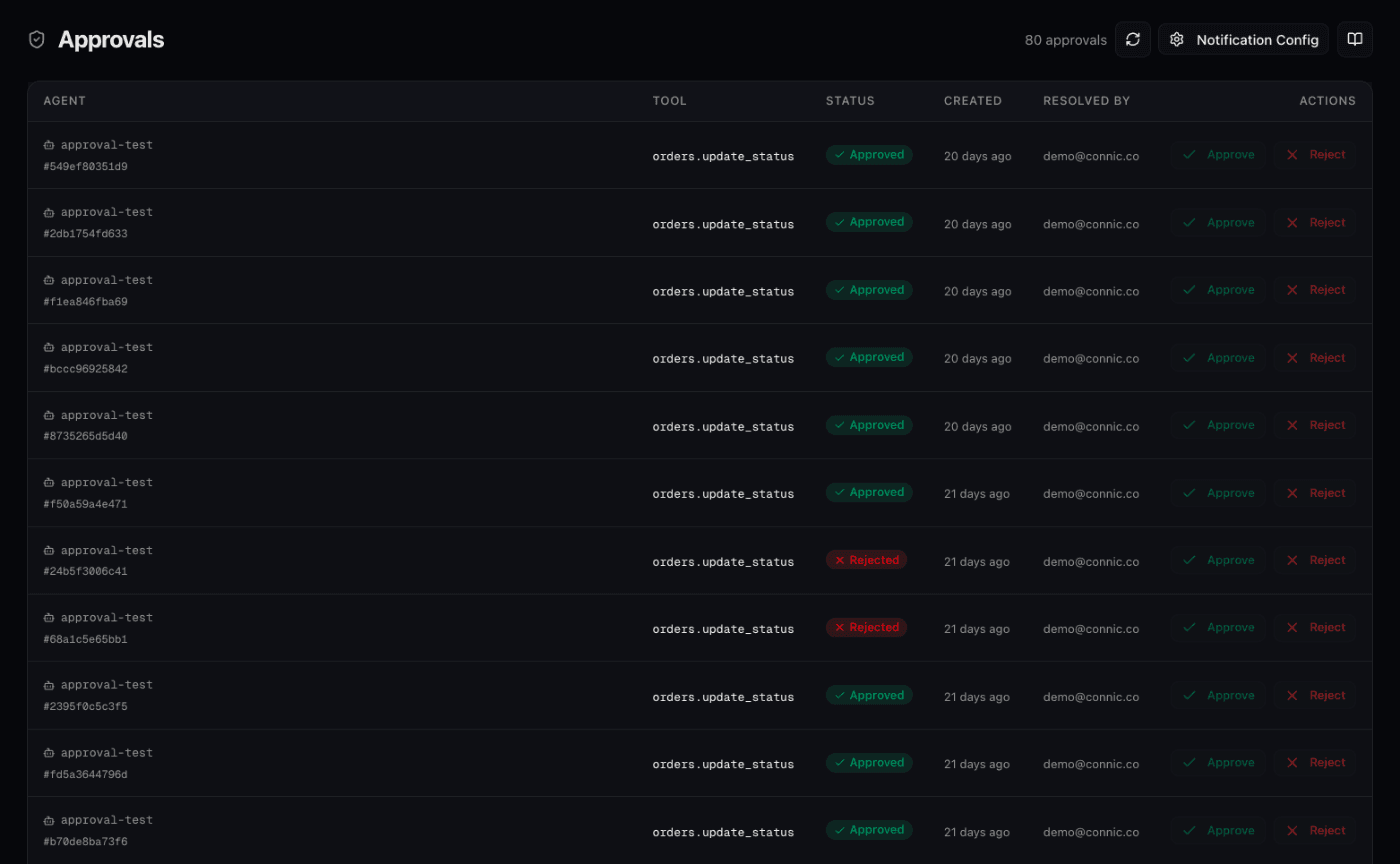
Every approval decision records who reviewed it, when they decided, what they approved or rejected, and an optional reason. Together, these records form a record of the human decisions made during agent execution.
EU AI Act: Why This Matters Now
For high-risk AI systems in the European Union, effective human oversight is an explicit requirement. In the official EU AI Act text, Article 14 covers how providers design oversight into high-risk systems, while Article 26 requires deployers to assign competent, authorised people to use those mechanisms. Connic Approvals can support those oversight measures inside an agent run.
The Act's Article 50 transparency duties generally apply from August 2, 2026. The AI Omnibus, in force since July 27, 2026, moved the high-risk rules to December 2, 2027 for Annex III systems and August 2, 2028 for systems embedded in regulated products. The Commission's implementation timeline also specifies a December 2, 2026 transition for Article 50(2) obligations for certain synthetic-content systems placed on the market before August 2, 2026. For teams in scope, practical oversight capabilities include:
on_rejection mode, the run either terminates cleanly or continues with the agent adapting to the decision.Beyond Approvals: Supporting Compliance Controls
Human oversight is one piece of the compliance puzzle. The EU AI Act also demands risk mitigation, data governance, transparency, and ongoing monitoring. Our platform provides the building blocks for all of these:
Together, these features form a defense-in-depth approach. Guardrails prevent harmful inputs and outputs covered by their configured checks, approvals gate selected actions behind human review, judges evaluate output quality, observability provides the transparency layer, and A/B testing validates changes on a controlled share of traffic. The required controls still depend on the system, its risks, and the applicable rules.
Real-World Scenarios
Illustrative approval configurations for production workflows:
param.amount > 100 handles the logic while the operations team reviews decisions during business hours.Testing approval, rejection, timeout, and supplied input
Tests can supply scripted decisions through approval_decisions. The tool field matches an existing tool reference or a generated input name. Optional params narrows the match using the pending request's parameters. In these test expressions the binding is params.*, while approval conditions use param.*.
defaults:
  strict_approval_decisions: true

tests:
  - name: supplies_mfa_code
    payload: Request an MFA code for demo@example.com, then report completion.
    approval_decisions:
      - tool: get_mfa
        params: params.account_email == "demo@example.com"
        decision: approve
        response: "001234"
    expected_result: status == "completed"

  - name: rejects_mfa_request
    payload: Request an MFA code for demo@example.com.
    approval_decisions:
      - tool: get_mfa
        decision: reject
        reason: Sign-in declined by the test
    expected_result: status == "failed"

  - name: times_out_mfa_request
    payload: Request an MFA code for demo@example.com.
    approval_decisions:
      - tool: get_mfa
        decision: timeout
    expected_result: status == "failed"
This example targets the input configuration above with on_rejection: fail. The quoted response is a dummy value that preserves its leading zeros. Reject and timeout decisions omit response. For an ordinary action gate, use decision: approve without a response, then check the intended result of the action in an isolated test setup.
Strict matching fails a case if a pending request has no matching decision or a scripted decision remains unused. Without a match in non-strict mode, the invocation returns with status == "awaiting_approval". Each decision entry is consumed at most once per invocation. The approval testing reference explains the matching rules.
- Check that an approved action executes with the reviewed parameters and a supplied input reaches the intended next step.
- Exercise rejection and timeout with the configured policy. For
continue, assert the fallback behavior as well as the final status. - Exercise two pauses in one run to check that later decisions persist and completed work is not repeated. Include the deployment gate if the project uses it.
- With a disposable sensitive value, inspect the recorded logs and traces after resumption for literal exposure. Check external destinations separately.
A completed status alone does not prove the agent used the response correctly. Add output or tool-call assertions for the workflow, and use custom-code mocks where appropriate to control side effects. Scripted decisions supply the human branch; they do not make every downstream tool a mock.
Getting Started
Adding approvals to an existing agent takes minutes:
Identify the tools in the agent that perform destructive, financial, or irreversible actions, and identify values the agent must request from a person
Add an
approvalblock to the agent YAML listing gated tools undertoolsand named input requests underinputs, with optional conditions for action gatesDeploy the agent. The next time a gated tool is called, the run will pause and create an approval request. Generated input tools pause for the requested text
Open the Approvals page in dashboard to review, approve, reject, or provide a response to pending requests
Set personal notification preferences and, for Enterprise projects, configure project-channel routing for approval requests
Start with the most dangerous tool, the one that worries the team whenever the agent calls it. Gate that tool, test the approval flow, then expand to other sensitive operations as needed.
For the complete configuration reference, check the Approvals documentation. Teams new to our platform can start with the quickstart guide to deploy a first agent, then add human oversight where it matters most.