
A Kafka cluster may sit in a private VPC, with a Postgres database behind a corporate firewall and internal APIs reachable only via private DNS. None of these services are accessible from the public internet, and for good reason.
AI agents may still need to react to events in these systems: process Kafka messages, listen for database changes, and call internal services. This requires bridging a cloud-hosted agent platform and infrastructure that was designed to be unreachable.
The Problem With Traditional Approaches
Teams typically reach for one of a few options when connecting cloud services to private infrastructure. Each has real downsides:
Cloud agents need a way to reach private services without making those services reachable from the internet. Connic Bridge provides that connection.
A Kafka cluster, Postgres database, internal API, or MCP server can connect through Bridge. Our sales team can map outbound-only routing, allowed hosts, approvals, and traces.
Discuss Bridge accessHow Connic Bridge Works
The Connic Bridge is a lightweight agent that runs inside the private network. It makes a single outbound WebSocket connection to the Connic relay, without requiring inbound ports, a VPN, or public exposure.
When a Connic connector needs to reach a service in the private network, the relay forwards the request through the established tunnel to the bridge. The bridge then opens a local TCP connection to the target service.
Setup in Three Steps
Getting Bridge running takes about five minutes with the existing network, certificates, and firewall rules left unchanged.
Generate a Bridge Token
Navigate to Project Settings > Bridge in the Connic dashboard and click Set Up Bridge. Copy the token that appears. It starts with
cbr_and is only shown once.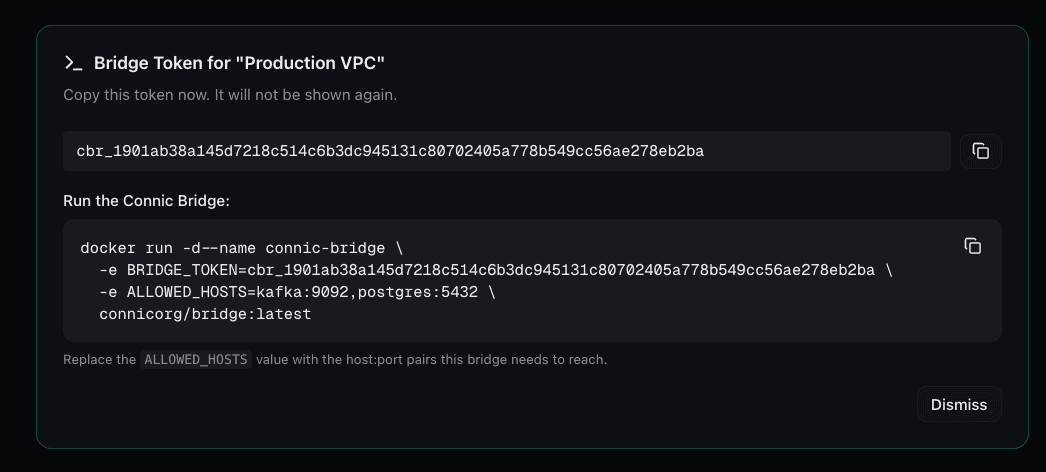
Project Settings → Bridge reveals the token once, alongside a copy-paste Docker command preloaded with it. Deploy the Bridge Agent
Run the bridge inside the private network. It needs outbound internet access to connect to the relay and local network access to reach the services.
Docker$ docker run -d --name connic-bridge \ -e BRIDGE_TOKEN=cbr_your_token_here \ -e ALLOWED_HOSTS=kafka:9092,postgres:5432 \ connicorg/bridge:latestThe
ALLOWED_HOSTSvariable is an optional comma-separated list ofhost:portpairs. When configured, requests targeting hosts outside the list are rejected. If it is unset or empty, the bridge can connect to every target reachable from its network.Prefer Docker Compose? That works too:
docker-compose.ymlservices: connic-bridge: image: connicorg/bridge:latest restart: always environment: BRIDGE_TOKEN: cbr_your_token_here ALLOWED_HOSTS: kafka:9092,postgres:5432,my-db:5432Enable Bridge on the Connectors
When creating or editing a connector, open the Network Access section and choose the bridge from the Bridge dropdown. Connic then routes that connector's traffic through the bridge tunnel instead of connecting directly. The pre-built connectors guide explains the connector layer before Bridge is added.
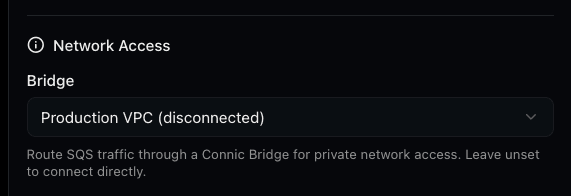
Each Bridge-capable connector picks a bridge in its Network Access section; leave it unset to connect directly. Bridge access is supported on:
Apache Kafka (inbound + outbound)AWS SQS (inbound + outbound)PostgreSQL (LISTEN/NOTIFY)Email / IMAP / SMTPAWS S3 (file downloads)HTTP Webhook (outbound)
Security by Design
The bridge was designed with a zero-trust mindset. Every layer limits what's possible:
Real-World Use Cases
A few patterns we see teams building with Bridge:
Bridge vs. Alternatives
| Connic Bridge | VPN / Peering | IP Allowlist | |
|---|---|---|---|
| Setup time | 5 minutes | Hours to days | Minutes (fragile) |
| Inbound ports required | None | Multiple | Per service |
| Blast radius | Explicit host:port list | Entire VPC / subnet | Per IP range |
| Firewall changes | None | Yes | Yes |
| Ongoing maintenance | Near zero | High | Moderate (IP churn) |
Monitoring a Bridge
Once deployed, bridge status is available at any time in Project Settings > Bridge. The dashboard shows whether the bridge is connected and when it last connected, with controls to regenerate or revoke the token.
BRIDGE_TOKEN environment variable in the bridge deployment. New tunnels using the old token are rejected immediately, and its active relay connection closes within seconds.Getting Started
For private infrastructure, Bridge provides a direct connection to AI agents:
Open the project in the Connic dashboard and go to Settings > Bridge
Generate a token and deploy the bridge container in the private network
Enable Connect via Bridge on any connector that targets a private service
The agents can now consume events from and deliver results to private infrastructure
The Bridge documentation provides the full configuration reference and troubleshooting guide. For a new Connic project, the quickstart guide covers the first agent deployment before it is connected to private infrastructure.