
Running Tests & CI
Test suite execution through the CLI, PR checks, local coverage, deployment gates, and test results.
On this page
Running Tests Ad-Hoc
# Discover YAML suites recursively under tests/,
# run every case in the selected environment, and exit
# with status 0 if all cases passed.
connic test
connic test picks the default standard environment's test_environment_id if one is set (see Environments), and falls back to the env itself otherwise. Override or filter as needed:
# Run only cases whose name contains the substring
connic test --filter adds_two_numbers

# Pick a specific environment to execute against
connic test --env <environment-id>

# Machine-readable output for CI
connic test --json

# Print local per-agent coverage without running agent tests
connic test --coverage
As cases finish, the CLI prints a results table and a dashboard link. Open it for per-case agent runs, traces, tool calls, and outputs.
Exit code is 0 when every case passed, 1 for a failed or cancelled test run or a CLI request error, and 2 for an infrastructure or server error.
Coverage Report
connic test --coverage is a static, offline report. It reads agents/ and tests/ from disk and reports which agents have suites and which tools their assertions cover. It requires no credentials and does not run agent tests.
The model is intentionally simple:
- Every agent counts equally. One of ten agents fully covered is 10% overall, regardless of tool count. This keeps the headline number honest when one agent has 20 tools and another has 2.
- Per-agent score = covered tools / total tools. A tool counts as covered if it appears at least once in any of that agent's
expected_tool_callsentries (bare or mapping form) orexpected_tool_call_order. To hit 100% on an agent, every one of its tools needs to show up in at least one case. - No test file → 0%. An agent without a corresponding
tests/<agent>.yamlcontributes 0 to the average. - Tool-less agents → 100% if a suite is discovered. Sequential agents and orchestrators have nothing to cover at the tool level, so a single suite is enough. Hidden and empty YAML files are skipped.
- A/B variants are skipped. Test variants like
support-test-fastshare the base agent's tools and are excluded from the count. - Discoverable tools count too. Both
toolsanddiscoverable_toolsare part of the denominator.
| Agent | Type | Tools covered | Coverage |
|---|---|---|---|
| stress-tester | llm | 1 / 1 | 100.0% |
| search-agent | llm | 1 / 3 | 33.3% |
| billing-bot | llm | no tests | 0.0% |
| Overall (3 agents) | 44.4% | ||
Uncovered tools are listed beneath the table. For search-agent above: web.fetch, web.summarize.
Pair it with --json to get a machine-readable report ({overall, agents: [{name, type, has_tests, tools_total, tools_covered, uncovered_tools, percent, parse_error}], error?}) suitable for a CI gate. For example, fail the build if overall coverage drops below a threshold, if the report has an error, or if any agent reports a parse_error. Coverage has no minimum percentage threshold; both text and JSON output exit with code 1 when local agents or test suites cannot be parsed or loaded. Valid reports exit with code 0 regardless of coverage percentage.
PR Testing
Run the suite against proposed changes from branches in the connected repository before they merge. When a pull request or merge request opens or its head updates, connic checks out the head commit, runs the same pipeline as connic test against the environment whose branch matches the target branch, and reports the result as a commit status. Fork-based pull requests and merge requests do not trigger a run.
Toggle It Per Environment
PR Testing is configured per environment and is enabled by default for environments with a Git branch. A PR into
mainuses the environment mapped tomain; a PR intodevelopuses the environment mapped todevelop.- Open Project Settings → Git & Environments.
- Edit the environment. The PR Testing toggle sits next to its deploy branch.
- Set a Test environment to run the suite against an isolated sibling environment instead.
Open a PR
connic detects the PR through the repository webhook, runs the suite, and posts the result back to the PR:
The status changes to pending when the run starts.It changes to success or failure when the run finishes.Pushing another commit to the PR reruns the suite automatically.Require It as a Merge Check (Optional)
connic reports the run as
connic/pr-tests. Configure the provider to block merges until that status succeeds:- GitHub: under Settings → Branches, edit the branch protection rule, require status checks, and add
connic/pr-tests. - GitLab: the status appears as an external job in the source-branch pipeline. Under Settings → Merge requests → Merge checks, enable Pipelines must succeed.
GitHub only lists a check context after it has seen it once. Open a PR with PR Testing enabled, then return to branch protection and add the check.- GitHub: under Settings → Branches, edit the branch protection rule, require status checks, and add
PR Testing supports GitHub and GitLab and requires at least one YAML file under tests/.
The Deploy Gate
A deployment with discovered YAML suites, whether triggered by connic deploy or by a git push to the connected branch, runs this three-step pipeline:
- 1. Build: validate and package the project.
- 2. Tests: execute every discovered case and capture its results.
- 3. Deploy to {env name}: activate only if every case passed. Otherwise the deployment is marked
FAILED.
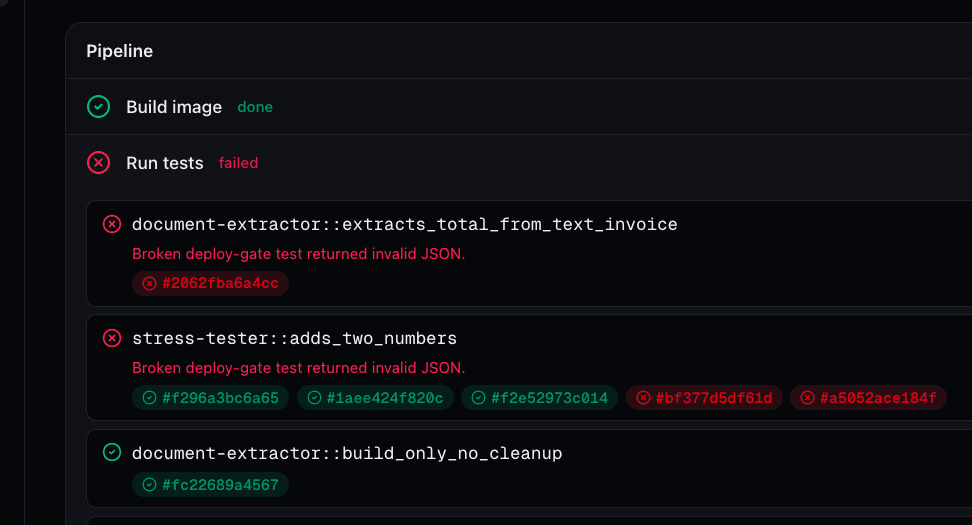
The pipeline is visible live on the deployment detail page in the dashboard. Each step shows pending → in progress → done; the test step expands to show the per-case list with per-invocation pills that open the run drawer.
Test environment override
By default tests run in the deploy environment. To isolate them from live billing APIs and data, point Settings → Git & Environments → Test environment at a sibling environment with test credentials and connectors. The deploy gate uses that environment for the test step and activates the deployment in the target environment when every case passes.
Skipping the gate
# Force a deploy through even if tests fail (or none exist yet).
# Available only on the CLI -- git auto-deploys never set this.
connic deploy --skip-tests
--skip-tests skips the gate for a CLI deployment. For a Git-connected project, open the Deployments page and choose Deploy & skip tests from the Deploy menu. Automatic Git deployments triggered by a push always run the gate. Use either option only as an escape hatch, for example, to ship a hotfix while a flaky test is being debugged.
Where Results Show Up
- Deployments list: every row carries a Tests column with the suite's pass/fail/skipped status. Ad-hoc
connic testruns appear with a purple Test run badge that distinguishes them from standard deployments. - Deployment detail → Pipeline: the Build → Tests → Deploy timeline with live per-step status.
- Tests step (expanded): one row per case, with status, success ratio, threshold, and a clickable list of agent run IDs.
- Run history: every test invocation lands in the runs table for the env it executed in, tagged with a purple badge for filtering or drilling into details.
Best Practices
Patterns that hold up once a suite has more than a couple of cases. How to set up the test env, keep external state from leaking, and write assertions that fail when something regresses.
Set up a dedicated test environment
Create a sibling environment in Settings → Git & Environments (e.g. staging-test) and point the standard environment's Test environment dropdown at it. The deploy gate and ad-hoc connic test use that selection. Environment variables, connectors, database data, retrieval content, and agent sessions are scoped by environment. See Configure environments.
For one-off CLI runs, pass --env <environment-id> to choose the environment explicitly. Keep most cases at runs: 1; use more runs with a lower success_threshold when the expected behavior is stochastic.
Real tools, scoped credentials
Tests call configured tools unless a case supplies mocks. Automatic outbound connectors are suppressed. Calls to agent-tool and middleware outbound connectors are recorded as mocked tool calls and are not delivered. Use test credentials and resources for every other external service, such as Stripe and S3.
For state that must exist before the agent runs, such as an API row or webhook fixture, use a dynamic payload builder. build() provisions the fixture and returns the agent input. Module-level builder state resets for each invocation. See Builder reference.
Clean up after dynamic builders
Environment scoping does not delete fixtures created in an application API or third-party sandbox. Implement cleanup(run, context, builder_args) beside build() and delete resources using identifiers stored in context. cleanup() runs after agent timeouts and errors. Returning False fails the case.
Thread fixture state through to assertions
The context dict the builder mutates is also bound as context.<key> inside expected_result and expected_tool_calls. Use it to verify the agent threaded the exact id the builder minted, not just some id of the right shape. Without that check, the agent can hallucinate a real-looking uuid and the case still passes. The canonical pattern is to stash an id in build, reference it in the payload, and pin both sides of the round-trip:
tests:
  - name: fetches_the_row_we_just_inserted
    builder: insert_then_query
    expected_result: output.row.id == context.test_uuid
    expected_tool_calls:
      - db.fetch_row: params.uuid == context.test_uuid and invocations == 1
See Reference context from yaml assertions for the matching builder.
Pin both branches of conditional tool selection
When an agent picks tool A or tool B based on input, write two cases: one asserting expected_tool_calls: [A] with expected_no_tool_calls: [B], and the mirror. Without the negative side, both cases pass as long as some tool got called, so a regression that swaps A and B goes undetected. The same pattern works for approval rules, conditional middleware, or any branch where the test must assert which path ran, not just that the agent called something.
Treat coverage as a separate PR check
connic test --coverage --json runs offline and does not execute agent tests. A separate CI job can parse overall, the optional top-level error, and each parse_error, then enforce a coverage threshold or reject malformed local agents and suites. See Read the coverage report shape.
Once tests/ contains a YAML suite, deployments run the test gate without extra CI configuration. Every push to a connected deployment branch runs the discovered suites.