
Overview
The Connic platform is where you deploy, monitor, and govern your agents. Everything from deployment pipelines to evaluation and human approvals lives here.
The platform handles the operational side of your agents. Deploy from Git or the CLI, monitor every run with traces and token metrics, score quality with LLM judges, ship safer changes through A/B tests and human approvals, manage environments per branch, and reach private services through the bridge, all under role-based access.
Platform Capabilities
Deploy & run
Deployment
Deploy agents via Git push or the CLI. Automatic builds, rollbacks, and full deployment history.
Environments
Separate staging, production, and dev environments with branch mapping and scoped variables.
Bridge (Private Networks)
Reach private services like internal APIs, databases, and on-prem LLMs without opening inbound firewall rules.
Database
A managed database in every environment. Store data in named collections and query with expressive filters. No migrations, no schema setup.
Observe & evaluate
Observability
Monitor runs, inspect execution traces, track token usage, and build custom dashboards.
Judges
Evaluate agent runs with LLM-based scoring rubrics. Configure sampling rates and track quality over time.
A/B Testing
Compare agent variants side-by-side by routing a percentage of traffic. Measure cost, latency, and quality differences.
Token Usage
Track daily LLM spend, set alerts and hard limits, detect anomalies, and receive spend reports.
Govern & collaborate
Approvals
Pause runs before sensitive tool calls. Team members approve or reject from the dashboard or via a webhook.
Knowledge Base
Upload text, PDFs, and images. Agents search this knowledge via built-in tools.
Team & Permissions
Invite members, assign roles, and track every change in the audit log.
REST API
Access your project programmatically with API keys: query runs, manage knowledge, pull cost data, and trigger agents from your own backend or tooling.
Observability at a Glance
Full details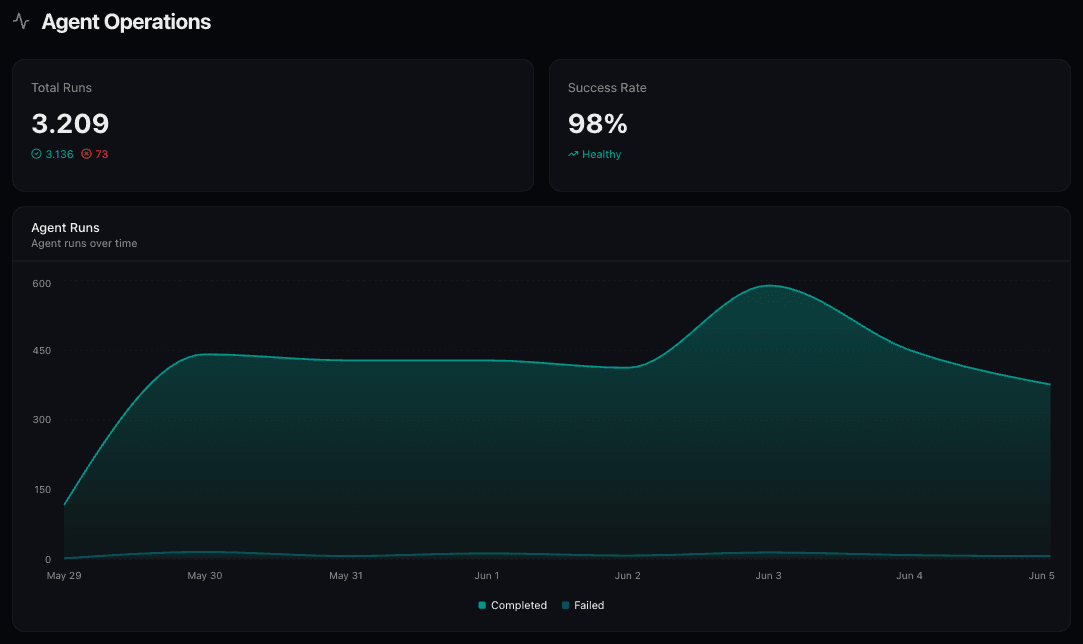
Search and filter all agent runs with advanced filtering by status, agent, time range, and more.
Hierarchical span view of every step in an agent run: LLM calls, tool executions, and sub-agent invocations.
Build stat cards, area charts, bar charts, and log views to visualize the metrics that matter to you.
Environments
Branch-based environment management
Map Git branches to environments. Each environment has its own deployments, variables, connectors, and run history.
- Scoped environment variables
- Dev/test environments for local testing
- Environment selector in the project header
Knowledge Base
Give agents long-term memory
Upload text, PDFs, and images. Content is chunked, embedded, and searchable by your agents at runtime.
- Namespace-based organization
- Agents can add and delete entries programmatically
- Vision model processing for images
Role-based access control for your entire project. Define who can deploy, manage settings, handle billing, and invite team members. All changes are tracked in the audit log.
View roles and permissionsRelated SDK Pages
The platform works hand-in-hand with the Composer SDK. These SDK pages are especially relevant to platform features:
Connectors define how your agents are triggered and where they send results: HTTP webhooks, cron schedules, Kafka, WebSocket, SQS, email, and more.
Explore connectors