
Knowledge Base
Upload documents, build a semantic search index, and give your agents access to your organization's knowledge through retrieval-augmented generation (RAG).
Overview
The knowledge base lets you upload documents and make their content searchable by your agents. When an agent uses the query_knowledge tool, it runs a semantic search across your uploaded content and returns the most relevant passages. This is commonly known as retrieval-augmented generation (RAG).
Access the knowledge base from the Knowledge tab in your project. The knowledge base is scoped to the active environment, so production and staging can have different content.
Uploads are indexed asynchronously. Each new text or file upload is queued first, tracked as an ingestion job, and becomes searchable after indexing completes.
Adding Knowledge
Click Add Knowledge to upload content. You can add content in two ways:
| Content Type | Supported Formats | Processing |
|---|---|---|
Text | .txt, .md, .markdown, .csv, .json, .jsonl, .yaml, .yml, .log | Accepted immediately, then chunked and embedded asynchronously for semantic search |
PDF | Queued for async extraction, chunking, and embedding. Page numbers are preserved in results. | |
Image | .png, .jpg, .jpeg, .gif, .webp | Queued for vision extraction and then embedded for retrieval |
After you upload content, open the Ingestion panel on the Knowledge page to track recent jobs, inspect failures, and retry failed uploads.
Upload Options
| Field | Description |
|---|---|
| Entry ID | Optional custom identifier. If omitted, one is generated. Useful for updating existing entries. |
| Namespace | Optional dot-separated path to organize entries hierarchically (e.g. policies.hr.leave). Agents can search within a namespace and all its sub-namespaces. Max depth is 10 levels. |
Namespaces
Namespaces let you organize knowledge entries into a hierarchy using dot-separated paths. For example, policies.hr.leave, policies.legal, and products.pricing.
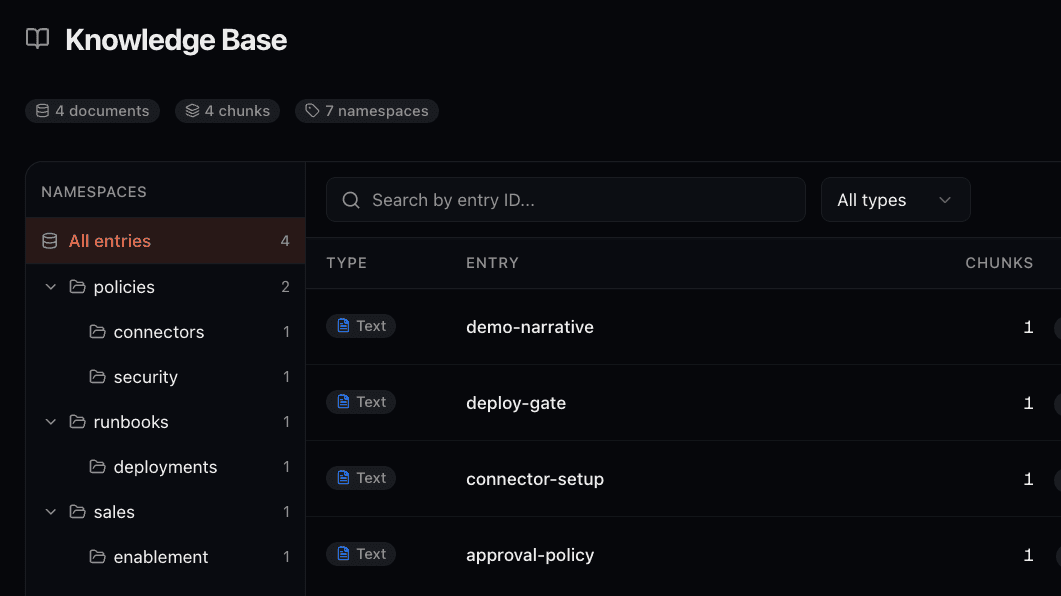
- Browse namespaces in the tree sidebar on the Knowledge page. Click a namespace to filter entries; child namespaces are included
- Agents can search within a namespace and all its sub-namespaces (e.g. querying
policiesalso searchespolicies.hr.leave) - Agents can discover the namespace hierarchy at runtime using the
kb_list_namespacestool - Maximum namespace depth is 10 levels
Querying the Knowledge Base
There are two ways to query the knowledge base:
From the Dashboard
Click the Search button on the Knowledge page to open the query dialog. Enter a natural language query and optionally filter by namespace. Results show the matching passages ranked by relevance score, with links to the source entry. This is useful for testing that your knowledge base returns the right content for expected queries.
From Your Agents
Give your agents access to the knowledge base using the built-in query_knowledge predefined tool. The agent searches for relevant content when it determines it needs additional context to answer a question.
version: "1.0"

name: support-agent
type: llm
model: gemini/gemini-2.5-pro
description: "Answers customer questions using the knowledge base"
system_prompt: |
  You are a customer support agent.
  Use the query_knowledge tool to find relevant information
  before answering questions.
tools:
  - query_knowledge
See the Knowledge Tools docs for full configuration options including namespace filtering, result limits, and score thresholds.
Managing Entries
The knowledge base table shows indexed entries. Recent uploads and ingestion failures are tracked separately in the Ingestion panel.
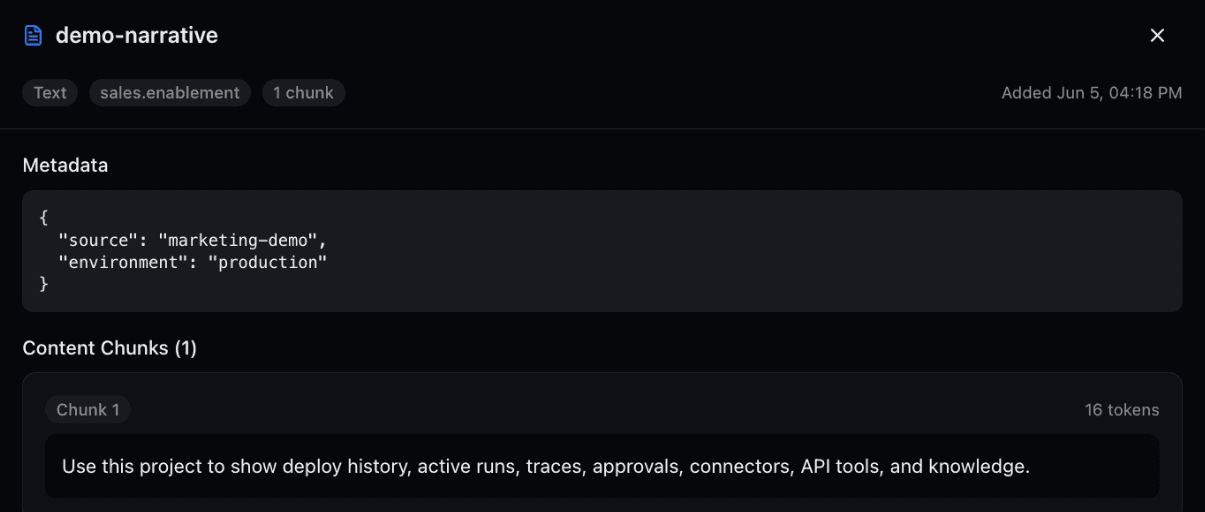
- View details: Click an entry to see its full content, all chunks with token counts, and metadata. For PDFs, page numbers are included per chunk.
- Filter: Narrow the list by selecting a namespace in the sidebar, searching entry IDs, or filtering by content type
- Delete: Remove entries you no longer need. This removes the entry and all its chunks from the search index.
- Upload status: Use the ingestion panel to monitor queued, processing, retrying, completed, and failed jobs.
Managing Knowledge from Agents
Beyond the dashboard, agents can programmatically add and remove knowledge entries using predefined tools:
| Tool | Description |
|---|---|
| store_knowledge | Store new text content in the knowledge base. Supports custom entry IDs, namespaces, and metadata. |
| delete_knowledge | Remove a specific entry by ID, or bulk-delete an entire namespace — optionally filtered by metadata using the same MongoDB-style operators as db_find. |
| kb_list_namespaces | List namespaces and their hierarchy so agents can discover how content is organized before searching. |
This lets agents build and maintain their own knowledge over time. For example, an agent could store summaries of processed documents or delete outdated entries. See the Predefined Tools docs for usage details and the Knowledge Tools docs for full configuration options.
Managing Knowledge via the REST API
Full request/response schemas and parameters for all knowledge endpoints.
Open Knowledge API ReferenceThe REST API provides full programmatic access to the knowledge base. This is useful for automating knowledge ingestion at scale, syncing content from external systems like CMS or documentation platforms, or building custom upload pipelines in CI/CD. Authenticate with an API key that has knowledge read and/or write permissions.
All knowledge endpoints require an environment_id query parameter, since knowledge is scoped per environment.
Upload Text
Ingest plain text into the knowledge base. The text is chunked, embedded, and indexed asynchronously. Returns a job ID for tracking progress. Optionally set namespace, entry_id, chunk_size, or chunk_overlap.
curl -X POST "https://api.connic.co/v1/projects/{project_id}/knowledge/text?environment_id={env_id}" \
  -H "Authorization: Bearer cnc_your_api_key" \
  -H "Content-Type: application/json" \
  -d '{
    "content": "Your document text here...",
    "namespace": "docs.api",
    "entry_id": "api-reference-v2"
  }'
Upload Files
Upload files (PDF, PNG, JPG, GIF, WebP, TXT, Markdown, CSV, JSON, YAML, and LOG) as multipart form data. Like text uploads, files are processed asynchronously and return a job ID. Use namespace and entry_id as query parameters to organize the entry.
curl -X POST "https://api.connic.co/v1/projects/{project_id}/knowledge/file?environment_id={env_id}&namespace=reports.q1" \
  -H "Authorization: Bearer cnc_your_api_key" \
  -F "file=@quarterly-report.pdf"
Browse and Inspect
List namespaces, browse entries with pagination and filtering, or retrieve all chunks for a specific entry.
# List entries filtered by namespace
curl "https://api.connic.co/v1/projects/{project_id}/knowledge/entries?environment_id={env_id}&namespace=docs&limit=50" \
  -H "Authorization: Bearer cnc_your_api_key"

# Get all chunks for a specific entry
curl "https://api.connic.co/v1/projects/{project_id}/knowledge/entries/api-reference-v2?environment_id={env_id}" \
  -H "Authorization: Bearer cnc_your_api_key"

# List namespace hierarchy
curl "https://api.connic.co/v1/projects/{project_id}/knowledge/namespaces?environment_id={env_id}&depth=3" \
  -H "Authorization: Bearer cnc_your_api_key"
Delete
Remove individual entries or delete an entire namespace and all its contents (including child namespaces).
# Delete a single entry
curl -X DELETE "https://api.connic.co/v1/projects/{project_id}/knowledge/entries/api-reference-v2?environment_id={env_id}" \
  -H "Authorization: Bearer cnc_your_api_key"

# Delete an entire namespace and everything under it
curl -X DELETE "https://api.connic.co/v1/projects/{project_id}/knowledge/namespaces/reports.q1?environment_id={env_id}" \
-H "Authorization: Bearer cnc_your_api_key"A typical automation pipeline might sync documentation nightly: delete the old namespace, then re-upload all current documents. Combined with namespaces, this lets you keep sections like docs.api, docs.guides, and policies.hr independently managed by different teams or scripts.