
Retrieval
Synced sources and uploaded documents form a semantic search index that agents access through retrieval-augmented generation (RAG).
On this page
Overview
Retrieval uploads documents and makes their content searchable by agents. When an agent uses the retrieval_query tool, it runs a semantic search across the uploaded content and returns the most relevant passages. This is commonly known as retrieval-augmented generation (RAG).
Access retrieval from the Retrieval tab in the project. Retrieval is scoped to the active environment, so production and staging can have different content.
Text and file uploads are queued as ingestion jobs and become searchable after indexing completes.
Adding content
Click Add content to upload content in either of two ways:
| Content Type | Supported Formats | Processing |
|---|---|---|
Text | .txt, .md, .markdown, .csv, .json, .jsonl, .yaml, .yml, .log | Accepted immediately, then chunked and embedded asynchronously for semantic search |
PDF | Queued for async extraction, chunking, and embedding. Page numbers are preserved in results. | |
Image | .png, .jpg, .jpeg, .gif, .webp | Queued for vision extraction and then embedded for retrieval |
After uploading content, open the Ingestion panel on the Retrieval page to track recent jobs, inspect failures, and retry failed uploads.
Upload Options
| Field | Description |
|---|---|
| Entry ID | Optional custom identifier. If omitted, one is generated. Useful for updating existing entries. |
| Namespace | Optional dot-separated path to organize entries hierarchically (e.g. policies.hr.leave). Agents can search within a namespace and all its sub-namespaces. Max depth is 10 levels. |
Namespaces
Namespaces organize retrieval entries into a hierarchy using dot-separated paths. For example, policies.hr.leave, policies.legal, and products.pricing.
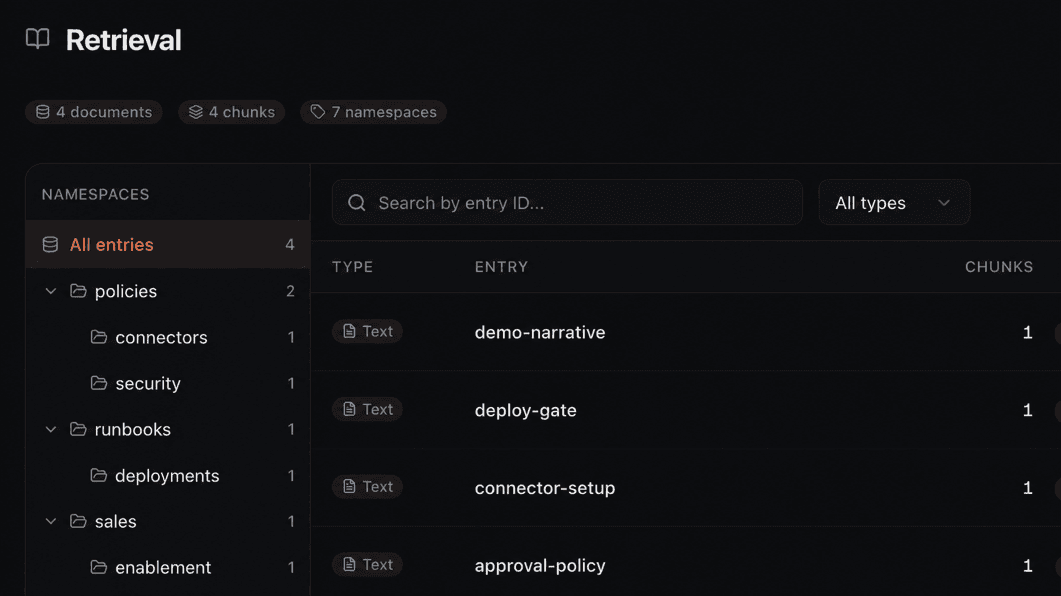
- Browse namespaces in the tree sidebar on the Retrieval page. Click a namespace to filter entries; child namespaces are included
- Agents can search within a namespace and all its sub-namespaces (e.g. querying
policiesalso searchespolicies.hr.leave) - Agents can discover the namespace hierarchy at runtime using the
retrieval_list_namespacestool - Maximum namespace depth is 10 levels
Querying the Retrieval
There are two ways to query the retrieval:
From the Dashboard
Click the Search button on the Retrieval page to open the query dialog. Enter a natural language query and optionally filter by namespace. Results show the matching passages ranked by relevance score, with links to the source entry. This verifies that retrieval returns the expected content for representative queries.
From Agents
Give agents access to retrieval using the built-in retrieval_query predefined tool. The agent searches for relevant content when it determines it needs additional context to answer a question.
version: "1.0"

name: support-agent
type: llm
model: connic/gpt-5.6-terra
description: "Answers customer questions using the retrieval"
system_prompt: |
  You are a customer support agent.
  Use the retrieval_query tool to find relevant information
  before answering questions.
tools:
  - retrieval_query
See the Retrieval Tools docs for full configuration options including namespace filtering, result limits, and score thresholds.
Synced Sources
Connect Notion, Confluence Cloud, Superhuman Docs (Coda), Zendesk Help Center, or a website from Retrieval → Sources. Each source is scoped to the active environment and writes entries into the selected namespace.
- Notion, Confluence, Superhuman Docs, and Zendesk support 15-minute, hourly, 6-hour, daily, or weekly schedules
- Website sources support 12-hour, daily, or weekly schedules
- Choose whether content absent from the connected source is removed from retrieval or retained
- Use Sync now for an on-demand run and inspect source-run counts and errors from the source details
- Project credit is charged for each item ingested during a source run
Managing Entries
The retrieval table shows indexed entries. Recent uploads and ingestion failures are tracked separately in the Ingestion panel.
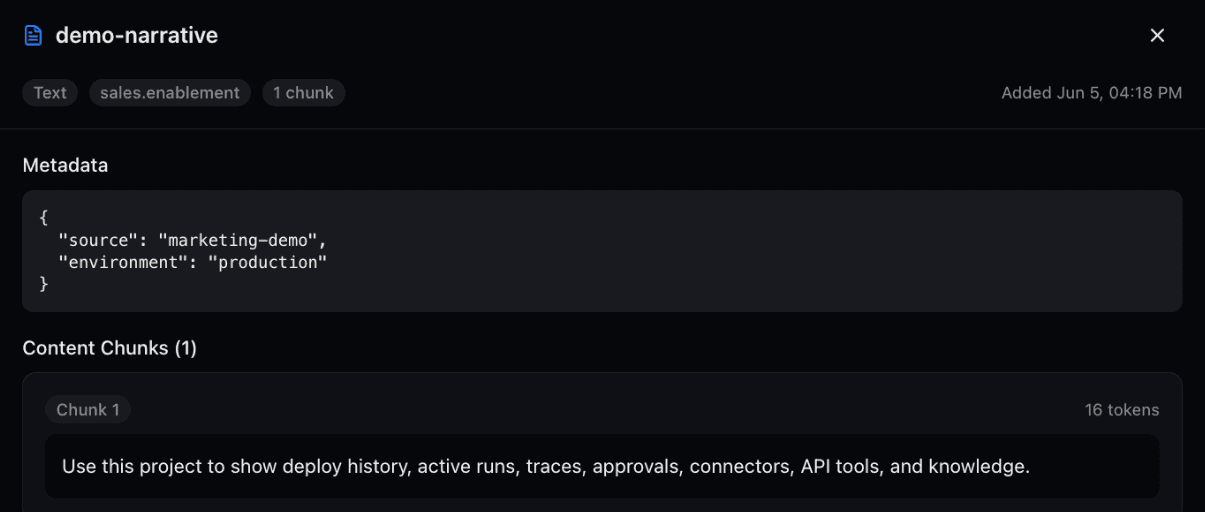
- View details: Click an entry to see its full content, all chunks with token counts, and metadata. For PDFs, page numbers are included per chunk.
- Filter: Narrow the list by selecting a namespace in the sidebar, searching entry IDs, or filtering by content type
- Delete: Remove an entry and all its chunks from the search index.
- Upload status: Use the ingestion panel to monitor queued, processing, retrying, completed, and failed jobs.
Managing Retrieval from Agents
Beyond the dashboard, agents can programmatically add and remove retrieval entries using predefined tools:
| Tool | Description |
|---|---|
| retrieval_store | Store text content in the retrieval. Supports custom entry IDs, namespaces, and metadata. |
| retrieval_delete | Remove a specific entry by ID, or bulk-delete an entire namespace, optionally filtered by metadata using the same MongoDB-style operators as db_find. |
| retrieval_list_namespaces | List namespaces and their hierarchy so agents can discover how content is organized before searching. |
Agents can store summaries of processed documents and delete entries through these tools. See the Predefined Tools docs for usage details and the Retrieval Tools docs for full configuration options.
Managing Retrieval via the REST API
Full request/response schemas and parameters for all retrieval endpoints.
Open Retrieval APIThe REST API supports retrieval uploads, queries, browsing, deletion, and source management. The upload, query, browse, and delete endpoints shown here require retrieval.manage. Source lists and source-run results require retrieval.view; connecting, editing, syncing, and removing sources require retrieval.manage.
All retrieval endpoints require an environment_id query parameter because retrieval is scoped per environment.
Upload Text
Ingest plain text into the retrieval. The text is chunked, embedded, and indexed asynchronously. Returns a job ID for tracking progress. Optionally set namespace, entry_id, metadata, chunk_size, or chunk_overlap. Text uploads accept up to 250,000 characters. For longer documents, use file upload instead.
curl -X POST "https://api.connic.co/v1/projects/{project_id}/retrieval/text?environment_id={env_id}" \
  -H "Authorization: Bearer cnc_your_api_key" \
  -H "Content-Type: application/json" \
  -d '{
    "content": "Document text goes here...",
    "namespace": "docs.api",
    "entry_id": "api-reference-v2"
  }'
Upload Files
Upload PDF, PNG, JPG, JPEG, GIF, WebP, TXT, MD, Markdown, CSV, JSON, JSONL, YAML, YML, and LOG files of up to 25 MB as multipart form data. Files are processed asynchronously and return a job ID. Use namespace and entry_id as query parameters to organize the entry.
To attach metadata such as a source or title, add a metadata form field containing a JSON object of up to 64 KB. Like text upload metadata, it is stored on every chunk and works with metadata_filter. connic always sets file_size and original_filename from the upload, replacing keys of the same name.
curl -X POST "https://api.connic.co/v1/projects/{project_id}/retrieval/file?environment_id={env_id}&namespace=reports.q1" \
  -H "Authorization: Bearer cnc_your_api_key" \
  -F "file=@quarterly-report.pdf" \
  -F 'metadata={"source": "finance", "title": "Q1 Report"}'
Browse and Inspect
List namespaces, browse entries with pagination and filtering, or retrieve all chunks for a specific entry.
# List entries filtered by namespace
curl "https://api.connic.co/v1/projects/{project_id}/retrieval/entries?environment_id={env_id}&namespace=docs&limit=50" \
  -H "Authorization: Bearer cnc_your_api_key"

# Get all chunks for a specific entry
curl "https://api.connic.co/v1/projects/{project_id}/retrieval/entries/api-reference-v2?environment_id={env_id}&namespace=docs.api" \
  -H "Authorization: Bearer cnc_your_api_key"

# List namespace hierarchy
curl "https://api.connic.co/v1/projects/{project_id}/retrieval/namespaces?environment_id={env_id}&depth=3" \
  -H "Authorization: Bearer cnc_your_api_key"
Delete
Remove individual entries or delete an entire namespace and all its contents (including child namespaces).
# Delete a single entry
curl -X DELETE "https://api.connic.co/v1/projects/{project_id}/retrieval/entries/api-reference-v2?environment_id={env_id}&namespace=docs.api" \
  -H "Authorization: Bearer cnc_your_api_key"

# Delete an entire namespace and everything under it
curl -X DELETE "https://api.connic.co/v1/projects/{project_id}/retrieval/namespaces/reports.q1?environment_id={env_id}" \
  -H "Authorization: Bearer cnc_your_api_key"