
A/B Testing
Agent variants are compared through exploratory traffic splits or statistically planned confidence experiments, with sequential decisions, sticky assignment, and safety guardrails for quality, reliability, cost, and latency.
On this page
Overview
A/B testing compares a base agent (control) with a test variant on live traffic in the same environment. connic offers two analysis modes: Confidence provides a statistically controlled recommendation, while Exploratory provides a descriptive comparison. Both modes track reliability, cost, latency, and judge scores.
Creating Test Agents
Test variants are regular agent YAML files that follow a naming convention: {base-agent}-test-{name}. The part before -test- must match an existing base agent name. The part after is the test identifier.
The base agent stays exactly the same. The variant can change anything: model, instructions, tools, temperature, etc.
name: order-processor
model: connic/gpt-5.6-terra
description: "Processes incoming customer orders"
system_prompt: |
  You process incoming orders...
tools:
  - orders.process
- inventory.checkname: order-processor-test-faster-model
model: connic/gpt-5.6-luna
description: "Processes incoming customer orders"
system_prompt: |
You process incoming orders...
tools:
- orders.process
- inventory.check-test- but no matching base agent exists, the deployment will fail with an error.Tool Versioning
Since each agent references tools by module path, a variant can point at a different tool module to compare tool implementations. Add an alternate tool file and reference it in the variant.
name: order-processor-test-batch-tools
model: connic/gpt-5.6-terra
description: "Processes incoming customer orders"
system_prompt: |
  You process incoming orders...
tools:
  - orders_batch.process    # alternate tool module
  - inventory.check
Choose an Analysis Mode
Use a pre-registered statistical plan for a controlled recommendation. connic calculates the sample targets, analyzes only at planned checkpoints, reports an adjusted confidence interval, and pauses when the evidence supports control, the variant, or an inconclusive result.
Use descriptive metrics when investigating behavior or when no statistical winner claim is needed. Choose a minimum completed-run count per group and decide when to pause, conclude, or change the experiment.
Traffic Assignment
The traffic percentage is the share assigned to the variant; the remainder stays on control. Confidence mode creates a durable assignment for every run or session and requires traffic in both arms. Its routing is exclusive, so only one confidence test can run for an agent in an environment at a time. Exploratory mode supports multiple concurrent variants as long as their combined traffic is at most 100%.
Session randomization requires a trusted session identity from the trigger path. All requests for that identity stay in the same arm, and only the first eligible run supplies the session's outcome. Pausing, concluding, or invalidating the test immediately routes subsequent traffic to the base agent.
Configuring Tests
Open the deployed base agent's detail page and click Manage A/B Tests in the header.
Deploy the test variant
Push the variant agent YAML alongside the base agent. Deployed variants appear in the available variants list.
Choose the analysis
Click New Test, select a deployed variant, choose Confidence or Exploratory, and configure the traffic split.
Review the plan and guardrails
For Confidence, verify the calculated sample targets and decision looks. Optionally add failure-rate and judge-quality auto-pause rules.
Start and monitor
Tests begin as drafts. Click Start to route traffic, then open the test to follow its metrics and decision status.
Safety guardrails
Add either check independently, or use both for production experiments.
Pause when the variant's failure rate exceeds the configured threshold across a complete rolling window of terminal runs.
Pause when the variant's recent normalized score from a selected automatic judge falls below a configured floor after the minimum number of evaluations.
Reading Results
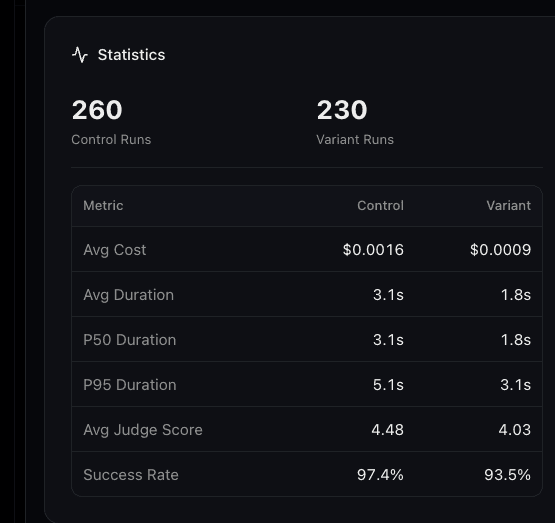
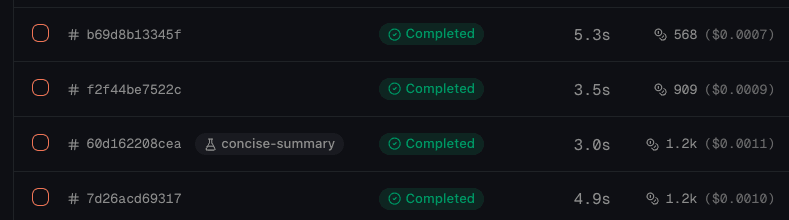
The test detail view shows a side-by-side comparison of control vs. variant:
Confidence tests add a live decision panel above the operational statistics. It reports the selected primary metric, control and variant values, effect in percentage points, sample progress for each arm, completed and upcoming looks, pending outcomes, and the current recommendation.
The allocation check detects a sample-ratio mismatch between the planned and observed traffic split. At a planned look, connic reports a sequentially adjusted interval and may recommend the variant, recommend control, continue collecting, or stop as inconclusive. A detected allocation mismatch, failed required judge analysis, or breached safety guardrail pauses the test without a winner claim.
Deployment & Test Lifecycle
Tests move from Draft to Running, and can then be paused or concluded. Exploratory settings remain editable while running or paused. A confidence plan, traffic allocation, and its safety settings lock on the first start so the experiment cannot change underneath its evidence.
- Validate assumptions: Use realistic baseline data and choose the smallest effect that would change the decision
- Plan for traffic: Check the calculated sample target and make sure the environment can reach it in a useful timeframe
- Use a complete judge: A confidence metric or quality guardrail requires an enabled automatic judge with 100% sampling and no run filters
- Change one thing at a time: For the clearest signal, each variant should differ in one dimension (model, prompt, or tools)
- Add both guardrails: Failure and judge-quality thresholds catch different ways a variant can regress
- Do not treat exploratory results as proof: Switch to Confidence when the decision needs a controlled error rate
- Test in staging first: Validate that the variant works before running a production A/B test in separate environments