
Production RAG gives an AI agent a narrow search capability. In connic, put trusted content in a named namespace, wrap semantic search in a purpose-specific Python tool, enforce read-only access in the agent YAML, and test both tool selection and citation output before deployment.
Formerly Knowledge Base
What a production RAG boundary controls
Retrieval-augmented generation adds relevant passages to an agent run before the model answers. Semantic search finds passages by meaning, but it does not decide which corpus is approved, whether the agent may write to it, or how the answer cites its evidence. Those decisions belong in the tool and agent configuration.
Build grounded agents on managed retrieval
Content remains scoped by namespace, each agent receives only the required search contract, and every retrieval call stays visible in its trace.
index approved content in a namespace
Open the Project's Retrieval page and upload the documents the agent may use. Assign a namespace such as
support.approvedand a descriptive entry ID such asrefund-policy-2026. A query against a parent namespace also searches its child namespaces, so a stable hierarchy leaves room to split policies, product docs, and runbooks later.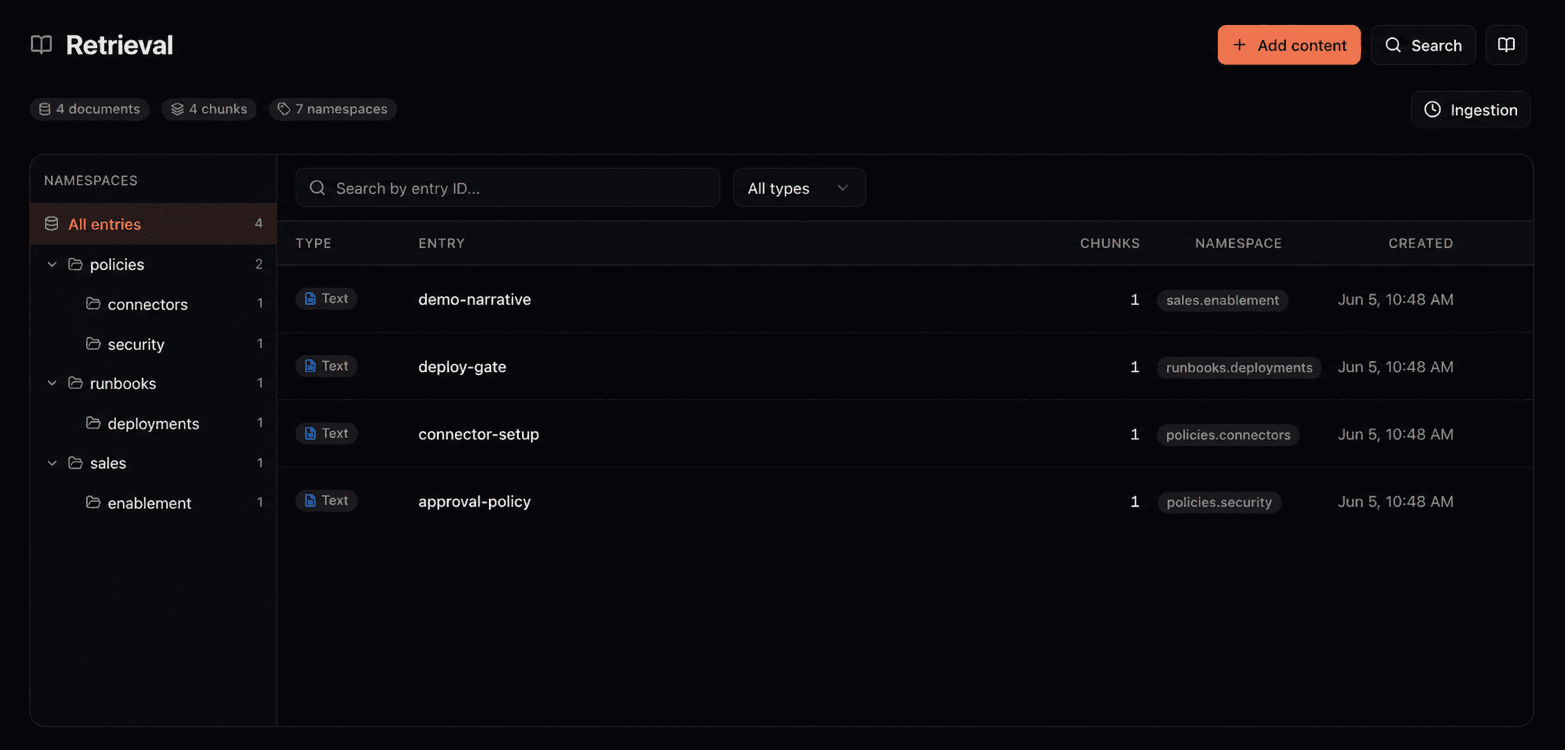
The Retrieval page groups indexed entries by namespace and shows the content available to semantic search. Uploads are indexed asynchronously. Wait until the ingestion job completes, then use the dashboard query to check representative questions before wiring the index into an agent. uploading and inspecting retrieval content.
expose a purpose-specific search tool
Custom tools are plain typed Python functions under
tools/. No decorator is required. Our platform uses the function signature and docstring to build the schema the model sees. This wrapper fixes the namespace and returns only the passage and citation fields the support agent needs:tools/support_knowledge.pyfrom connic.tools import retrieval_query async def search_support_docs(question: str) -> list[dict]: """Find approved support passages for a customer question. Args: question: The customer's policy or product question. """ result = await retrieval_query( query=question, namespace="support.approved", min_score=0.35, max_results=5, ) matches = [] for item in result.get("results", []): source = item["entry_id"] page = item.get("page_number") citation = f"{source}, p. {page}" if page else source matches.append({ "passage": item["content"], "citation": citation, }) return matchesThe predefined
retrieval_queryfunction returns ranked chunks with source fields includingentry_id,namespace, andpage_numberwhen the source has pages. The wrapper converts those fields into the citation format the product will display. connic returns the evidence; the tool and prompt define how the answer cites it.Directly attaching
retrieval_queryis useful for a prototype or a general internal operator. A production support agent should not choose arbitrary namespaces or tune search parameters at run time. It also should not receiveretrieval_storeunless writing indexed content is part of its job. Keep ingestion in the dashboard, a retrieval source, or a controlled API pipeline for reader agents. custom retrieval wrapper reference.enforce the same boundary in agent YAML
Attach the wrapper by its module and function name. The retrieval block is a second, runtime-enforced boundary: this agent can reach only
support.approvedand its child namespaces, and it cannot store or delete content there.agents/support-agent.yamlversion: "1.0" name: support-agent type: llm model: connic/gpt-5.6-terra description: "Answers support questions from approved documentation" system_prompt: | Answer policy and product questions only from passages returned by search_support_docs. Cite every supported claim in square brackets using the citation value from the tool result. If the search returns no relevant passage, say that the approved documentation does not answer the question. Do not guess. tools: - support_knowledge.search_support_docs retrieval: namespaces: support.approved: prevent_write: true prevent_delete: trueThe wrapper improves the tool interface; the YAML access block limits what the underlying retrieval call can do. Keep both. A later refactor that changes the wrapper's namespace still hits the agent-level allowlist instead of silently widening access.
test retrieval use and citation output
Mock the custom wrapper for deterministic agent tests. The mock below returns one known passage and citation without depending on the current index contents. Mocked custom tool calls still appear in the trace and count toward tool-call assertions.
tests/mocks/support_knowledge.pydef mock_support_knowledge_search_support_docs(tool_name, params, context): return [{ "passage": "Enterprise refunds are available within 60 days.", "citation": "refund-policy-2026, p. 12", }]tests/support-agent.yamlversion: "1.0" tests: - name: cites_the_refund_policy payload: "What is the enterprise refund window?" mocks: support_knowledge strict_mocks: true expected_tool_calls: - support_knowledge.search_support_docs: invocations == 1 expected_result: '"[refund-policy-2026, p. 12]" in output' - name: skips_retrieval_for_a_greeting payload: "Say hello." mocks: support_knowledge strict_mocks: true expected_no_tool_calls: - support_knowledge.search_support_docsThe first case catches a model or prompt change that stops searching or drops the source reference. The second catches unnecessary retrieval on a prompt the model can answer without company knowledge. Run the suite with
connic test; the same tests run as the deployment gate. Keep a separate non-mocked case in a test environment to detect indexing or relevance changes as well. Tool-call assertion reference.
Production checks before release
The retrieval query and storage reference covers the APIs, and the quickstart walks through deployment.