
Automated agent scoring uses an LLM to grade every agent run against defined criteria instead of relying on manual review. Once AI agents handle real traffic, operating without measurement means shipping changes based on impressions instead of data.
Manual review does not scale to hundreds or thousands of runs per day. Automated evaluation uses an LLM to score agent runs against defined criteria, surface quality trends, and alert the team when quality degrades.
That's the LLM-as-a-judge pattern. Connic calls them Judges, and they turn agent quality from a guessing game into a measured, tracked metric.
Why Automated Evaluation Matters
AI agents are non-deterministic. The same input can produce different outputs across runs. A prompt change that improves one use case might break another. Without continuous evaluation, quality problems only surface when users complain.
LLM-as-judge evaluation grades agent output on defined criteria, with no separate eval tool to integrate.
Try Connic freeFurther reading: Judges.
How LLM Judges Work
The concept is straightforward. Use a language model to evaluate another language model's output. A scoring rubric defines the specific criteria that matter for the use case, and the judge LLM scores agent runs against that rubric. Recent 2025 research adds useful nuance to early LLM-as-a-judge results. Huang et al. (2025) found that fine-tuned judges can perform well in-domain but weaken on generalizability, fairness, and adaptability, while Thakur et al. (2025) found that high agreement can still hide material score differences and prompt sensitivity. The practical answer is calibration, and Connic gives teams the rubrics, filters, sample rates, stored reasoning, score history, and alerts to run that evaluation loop continuously.
The judge receives the full run context: the input, the output, the execution traces, token usage, and any context metadata. It evaluates each criterion independently and returns a score with reasoning for every one.
Setting Up a Judge
A judge has four components: the agent it evaluates, the model it uses for scoring, the scoring criteria, and the trigger configuration.
Define the Scoring Criteria
This is the most important step. Vague criteria produce inconsistent scores. Specific criteria produce useful, actionable evaluations.
Vague Criteria- • "Quality" (max 10)
- • "Helpfulness" (max 10)
- • "Good response" (max 10)
Specific Criteria- • "Extracted all invoice line items" (max 10)
- • "Used correct tool for the task" (max 5)
- • "Response under 200 words" (max 5)
Each criterion gets a name, a description that tells the judge exactly what to evaluate, and a maximum score. The judge scores each one independently, showing which aspects of performance are strong and which need work.
Choose a Trigger Mode
AutomaticEvaluates runs as they complete. Set the sample rate from 1-100% to balance coverage and cost, and use filters to focus evaluation on the traffic that matters.ManualEvaluation is explicitly triggered on specific runs. This is useful when testing a new judge configuration, re-evaluating after criteria changes, or spot-checking suspicious runs.Tip: Calibrate, Then AutomateStart in manual mode on a representative set of runs and compare scores with the team's expectations. Refine the rubric, then switch to automatic mode for continuous monitoring.Add a System Prompt (Optional but Recommended)
Give the judge domain context. If an agent processes medical insurance claims, describe what a correct claim determination looks like. If an agent writes marketing copy, describe the brand voice and quality bar.
Example Judge System PromptYou are evaluating a customer support agent for an e-commerce platform. A high-quality response should: - Directly address the customer's specific question - Reference the correct order, product, or policy - Provide actionable next steps (not generic advice) - Maintain a professional, empathetic tone - Avoid making promises the company cannot keep If the agent used tools, verify it queried the correct data before responding.The evaluated agent's own system prompt can also be included in the judge's context. This gives the judge both the intended task and the agent's actual behavior.
A Complete Example
A practical example: evaluating a document extraction agent that processes invoices.
Model
openai/gpt-5.4 (or any model with strong reasoning)
Trigger
Automatic - 100% sample rate (low volume, evaluate every run)
Criteria
With this setup, every invoice extraction run is scored out of 30. The dashboard shows at a glance whether accuracy is high but completeness is dropping, or whether the agent is guessing instead of flagging uncertainty. Each score comes with reasoning explaining why the judge assigned that number.
Run Filters: Focus Evaluations Where They Matter
Not every run needs evaluation. Filters target specific traffic:
That supports separate judges for different scenarios. A support agent handling both billing and technical questions might need two judges with different criteria and filters instead of one blended evaluation.
Quality Alerts
Scores are useful. Alerts are actionable. Configure a score threshold and get notified when quality drops below it.
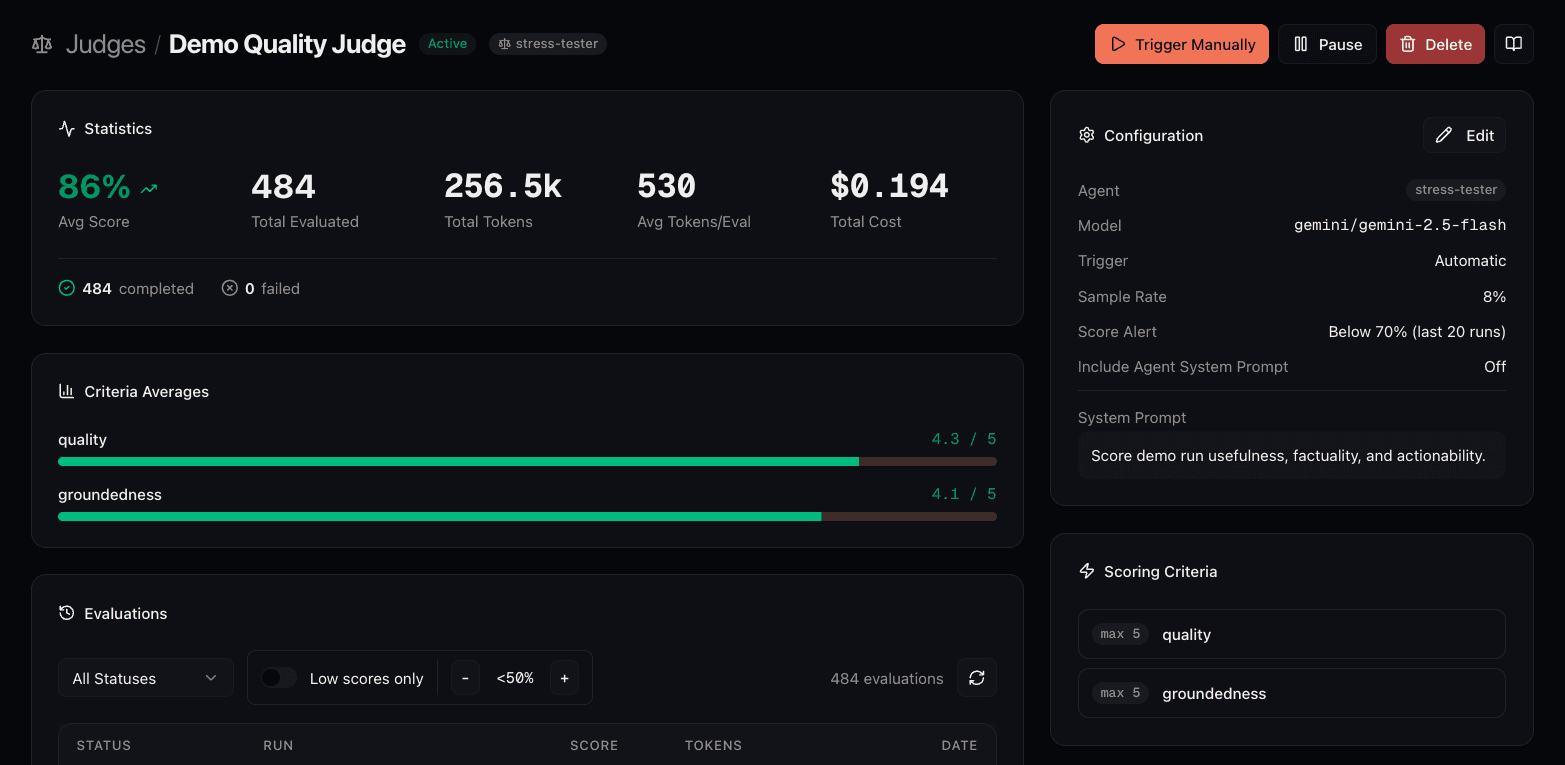
What the Dashboard Shows
The judge detail page shows quality over time:
Practical Patterns
A few evaluation setups that work well in production:
Cost Considerations
Each successfully completed judge evaluation consumes one additional run unit and makes an LLM call. Run-package volume savings apply to the judge run unit, not the model call. A few ways to keep costs reasonable:
- •Use sample rates for high-volume agents. Choose a rate that provides useful coverage without evaluating every run.
- •Benchmark efficient judge models. A cheaper judge can reduce cost; validate it against the same labeled set before switching.
- •Keep criteria focused. Five specific criteria beat twenty vague ones. Fewer criteria also mean shorter prompts and lower token usage.
- •Use filters to exclude noise. Don't evaluate test runs, internal debugging, or low-value traffic.
Getting Started
Adding a judge to an existing agent is straightforward:
Navigate to Judges in the Project and create a new judge
Select the agent to evaluate and choose a model for the judge
Define 3-5 specific scoring criteria with clear descriptions
Set manual mode and test on a set of recent reviewed runs
Refine the rubric, then switch to automatic monitoring
Set a score alert threshold so quality drops trigger a notification
The hardest part is writing good criteria descriptions, which deserve most of the attention. Everything else is configuration.
The full setup guide is in the Judges documentation. For teams new to Connic, the quickstart guide covers deploying a first agent before a judge is added to start measuring quality.