
Pre-built AI agent connectors are configured integrations between an agent runtime and an external event source or destination. For teams building AI features into existing software, they can replace custom webhook, consumer, listener, or delivery code, but supported modes and failure guarantees vary by connector.
Which platforms provide pre-built connectors for AI agents?
A connector can mean event delivery that starts an agent run, or an app action the agent calls inside a workflow. Among the documentation reviewed, Connic is the only platform that defines inbound, sync, and outbound as first-class connector modes attached to deployed agents. The other platforms solve parts of the same problem through workflow nodes, application routes, durable functions, channels, or separately assembled cloud services.
| Platform | Modes and connector model | Documented guarantees or recovery | Official sources | Last verified |
|---|---|---|---|---|
| Connic | Managed connector instances in explicit inbound, sync, or outbound mode. Bridge reaches private networks. | Transport-specific behavior. For SQS, messages are deleted after all linked agents succeed; failures return after the visibility timeout and can follow an AWS redrive policy. No global exactly-once claim. | Connector modes · SQS recovery | |
| n8n | Trigger nodes provide inbound events; app nodes can become agent tools. Webhook plus Respond to Webhook provides a sync equivalent. | Retry On Fail is opt-in per node, and failed executions can be retried manually. No platform-wide delivery, ordering, or exactly-once guarantee across integrations. | Trigger nodes · Sync responses · Retry settings · Execution retry | |
| Zapier Agents | Runs on demand, on a schedule, from an app event, a Zap, or MCP. App actions become tools; Run Agent can wait or continue. | Agent activity can end as Failed or Needs action. Zap Autoreplay is separate; the Agent documentation does not promise automatic action retry or replay. | Agent triggers · Agent actions · Wait or continue · Agent statuses · Zap replay | |
| Agentuity | Agents run from routes, workers, schedules, or scripts. HTTP routes can respond synchronously; managed webhooks and queues handle asynchronous intake. | Webhook receipts keep per-destination delivery records and support API retries. Queues expose maximum retries, visibility timeout, and idempotency keys. | Execution model · Webhook recovery · Queue behavior | |
| Inngest AgentKit | Agents run inside Inngest Functions triggered by events, cron schedules, or webhooks. Actions use code-defined tools or MCP. | Functions or steps receive four retries after the first attempt by default. Completed step results persist for reuse; replay and a 24-hour event-ID idempotency window are documented. | Function triggers · Retry behavior · Replay · Idempotency | |
| LangSmith Deployment | Agent Server provides background, wait, and streaming runs, plus cron jobs, completion webhooks, MCP, and A2A. | Runs enter a durable task queue; graph state can be checkpointed. Connection recovery and failed background-run retries are documented. The webhook changelog notes timeout retries, but the main guide publishes no complete delivery guarantee. | Agent Server · Fault tolerance · Webhook guide · Timeout retries | |
| Vercel eve | Channel adapters normalize inbound messages and deliver responses. Built-ins cover HTTP, Slack, Discord, Teams, Telegram, Twilio, GitHub, and Linear. | Session events are durably recorded before a step completes; clients can reconnect or rewind with a cursor. No generic ingress-deduplication or reply-redelivery guarantee is stated. | Channel adapters · Durable sessions | |
| Amazon Bedrock AgentCore | Runtime accepts HTTP or SDK invocation and returns JSON, SSE, or WebSocket output. Gateway presents APIs, Lambda functions, and MCP servers as tools. | Direct HTTP callers without an AWS SDK must implement retries. Runtime does not document connector-level event replay; event-source ingestion uses other AWS services or application code. | Runtime invocation · Protocol contract · Gateway targets |
“Documented guarantees” means behavior stated in the linked product documentation, not a blanket SLA. None of these rows should be read as a universal exactly-once guarantee.
Our AI agent deployment comparison describes the runtime trade-offs. The Connic connector catalog lists supported modes and configurations. The invoice webhook walkthrough below shows a complete request and result using an existing agent template.
What custom integration code includes
A production agent needs an input path and, often, an output path. Depending on the source, a hand-built integration may require a signed webhook handler, queue visibility-timeout handling, or a long-lived database listener. The application team owns that code unless the platform documents it as connector behavior. This also applies to AI features in existing software.
Supported webhooks, queues, databases, and email sources can be configured without self-hosting each consumer.
Try Connic freeConnector evaluation checklist
Check each connector's documentation before treating it as managed infrastructure. For each source, verify:
- Which modes does it support, and does one configured instance run in only one mode?
- Who authenticates the source or signs the outbound request?
- What happens on failure: retry, visibility timeout, redelivery, or an optional provider DLQ?
- What payload and result schemas, size limits, and ordering guarantees are documented?
Featured Connic connector examples
We support connectors such as Webhook, Kafka, SQS, PostgreSQL, and Email. These five featured examples show how different event sources change the integration work around an agent. The current connector catalog lists every available connector, mode, and configuration option.
| Featured connector | Typical use |
|---|---|
| Webhooks (HTTP) | Run an agent on any inbound HTTP request. |
| Apache Kafka | Consume topics to trigger agents, produce results back. |
| AWS SQS | Delete after successful runs; failed messages return after the visibility timeout and follow an optional AWS redrive/DLQ policy. |
| PostgreSQL | LISTEN for NOTIFY messages sent by application code, a user, or a database trigger. |
| Email (SMTP/IMAP) | Poll an IMAP inbox inbound; a separate outbound configuration sends the agent result over SMTP. |
Connectors in the Connic Marketplace
Our pre-built connectors live in the Connic Marketplace, the catalog of building blocks for Connic projects. They sit alongside agent templates, which scaffold working agent setups into a project repository, and retrieval sources, which sync content into an agent's retrieval. The connector catalog describes each connector's modes, configuration, and event handling.
Agent template pages can list the connectors they expect. Teams can then check the required event sources before configuring the template. The Marketplace announcement covers the launch details. Our trigger comparison helps with choosing between webhook, Kafka, SQS, and Postgres for the inbound path.
Inbound, outbound, and sync
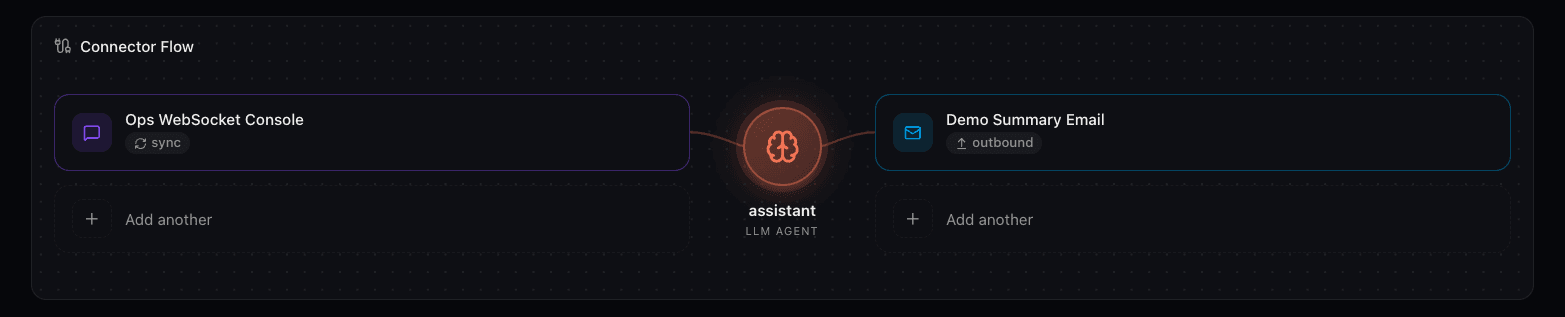
Connic defines three modes. Inbound starts an agent from an external event. Outbound sends an agent result to an external system. Sync starts a run and returns the result in the same request. A connector type may support several modes, but one configured connector instance has one mode. An inbound-and-outbound flow therefore uses two configured instances, including for Kafka or email.
Process an invoice through a synchronous webhook
An application can submit invoice text to an HTTP webhook and receive extracted fields in the same response. The Invoice Processor template supplies the agent, calculator tools, output schema, middleware, and tests. This example links the webhook to invoice-extractor, which returns the invoice fields. The template's separate invoice-pipeline adds deterministic validation and returns that validation result.
Deploy the invoice template
Create a Connic project without connecting a Git repository, then create a project API key. This walkthrough uses the CLI deployment path in the quickstart. Scaffold the template in a new local directory. When
connic loginprompts, paste the login token shown when creating the key. The deployment runs the included test suite before activating the agents.terminalpip install connic-composer-sdk connic init invoice-webhook --templates=invoice cd invoice-webhook pip install -r requirements.txt connic login connic deployAttach the HTTP webhook
Open
invoice-extractorin the deployed environment. In its connection flow, choose Add inbound connector, then Create New Connector and HTTP Webhook. Select Sync (Request-Response), keep authentication enabled, and link only this agent for the single-result response used below. Copy the generated webhook URL and secret from the connection details. The webhook documentation covers the settings and authentication options.Submit a sample invoice
Replace the URL and secret placeholders with the copied values. This request sends fictional invoice text as JSON; the secret belongs in the request header.
terminalcurl --fail-with-body --max-time 310 '<webhook-url>' \ -H 'Content-Type: application/json' \ -H 'X-Connic-Secret: <webhook-secret>' \ --data '{ "message": "Extract the fields and check the arithmetic in this invoice.", "text": "Example Supplier, invoice INV-001. Issued 2026-09-11, due 2026-09-25. Consulting: 2 hours at EUR 100, line total EUR 200. Subtotal EUR 200. Tax 19%: EUR 38. Total EUR 238." }'Read the result and inspect the run
With one linked agent, the response contains
result.run_id,result.status,result.output, andresult.error. Check thatresult.statusiscompleted, then decode the string inresult.outputas JSON. The outerstatus: "ok"does not establish that extraction succeeded. For this sample, check the extracted currency and total againstEURand238. The extractor uses calculator tools and the template's invoice schema; inspect the run trace to see its tool calls and any error.Sync waits up to five minutes for the run, while the template sets a shorter agent timeout. A 401 response indicates failed webhook authentication. For work that should continue in the background, use inbound mode and a separate outbound connection to deliver the result. The connection patterns guide explains that choice; the runs and traces documentation covers investigating runs.
Where MCP fits
MCP (the Model Context Protocol) is available as a connector. The MCP connector details explain how it publishes an agent as a callable tool for an MCP client. Event connectors trigger runs or deliver results through external systems. The MCP connector guide distinguishes publishing an agent from giving it access to external MCP tools.
When custom integration code is still necessary
An internal or niche system with no connector needs a custom tool that the agent can call. If the system is only reachable inside a private network, Connic Bridge can route the connection without exposing that service publicly.